P2S
Best value enclosedThe P1S successor Bambu didn't have to make better, but did. Same build volume and a fully enclosed, passive (not actively heated) chamber, now with 600 mm/s, at $549 in Bambu's US store. The default answer to "I want a Bambu that prints ABS" alongside the P1S ($369, the budget route).
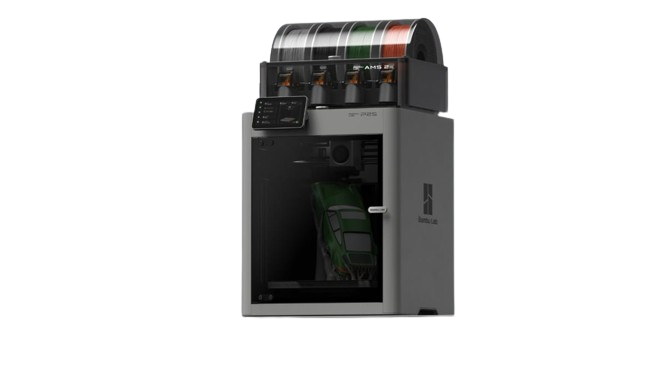
Image: Bambu Lab.
Should I buy the P2S?
Yes. It's the most straightforward buying decision in Bambu's lineup. If you want a fully enclosed machine that handles ABS and ASA reliably, costs under $600, and works out of the box, this is it. Better than the P1S, but $180 more ($549 vs $369), so the P1S stays the budget pick.
Who should buy the P2S?
- ABS, ASA and CF compositesGood fit
Bambu lists ABS, ASA, PC and carbon-filled nylons such as PA6-CF and PPA-CF for the P2S, printed through the stock hardened steel nozzle. P1S vs P2S → (Bambu P2S FAQ) - MulticolorGood fit
Up to four AMS 2 Pro plus four AMS HT units, 20 slots in total. P2S vs X2D → (Bambu wiki) - PPS and 350°C materialsLook elsewhere
The hotend tops out at 300°C and the chamber is not actively heated; the H2S adds a 350°C hotend and a 65°C heated chamber. P2S vs H2S → (Bambu P2S FAQ) - Upgrading from the P1SDepends
Faster (600 mm/s vs 500 mm/s) with a hardened steel nozzle and the same 256 × 256 × 256 mm build volume; Bambu says a P1S cannot be converted into a P2S. P1S vs P2S → (Bambu P2S FAQ)
Known issues
- Firmware 01.03.00.00 adds E3D High-Flow hotend support and 1000 mm/s travel moves, but both need Bambu Studio 2.8.3.66 or later, which is a public beta as of October 2, 2026. (Bambu release notes · Bambu Studio releases)
- No Ethernet port: Bambu's FAQ says the P2S does not support a wired network connection. (Bambu P2S FAQ)
- No active chamber heating: Bambu regulates the chamber through the closed chassis and by switching between internal and external air circulation. (Bambu P2S FAQ)
Known issues only from Bambu's own wiki, firmware release notes, FAQ, blog and recall pages, checked October 2, 2026. Specs: our table below and Bambu's spec pages.
| Motion & Print | |
|---|---|
| Build volume | 256 × 256 × 256 mm (10.1 × 10.1 × 10.1 in) |
| Max speed | 600 mm/s |
| Acceleration | 20,000 mm/s² |
| Motion system | CoreXY (updated) |
| Layer height (0.4 mm nozzle) | 0.08–0.28 mm (Bambu Studio default range) |
| Extruder | Direct drive (updated) |
| Nozzle (stock) | 0.4mm |
| Temperature & Enclosure | |
|---|---|
| Nozzle max | 300°C |
| Bed max | 110°C |
| Enclosure | Yes |
| Chamber heating | Passive, about 50°C (Bambu's figure, not actively heated) |
| Air filter | Activated carbon, no HEPA stage (Bambu still lists particulate filtration as supported) |
| Carbon filter | Yes |
| Bed surface | Textured PEI (magnetic) |
| Auto leveling | Yes |
| Vibration comp. | Yes |
| Flow calibration | Yes (automatic) |
| Camera | Yes (included) |
| AMS | AMS, AMS 2 Pro, AMS HT (up to 20 slots) |
| Display | Touch LCD |
| Connectivity | Dual-band Wi-Fi (2.4 + 5 GHz), LAN mode, no Ethernet port |
| Machine dimensions | 392 × 406 × 478 mm |
| Weight | 14.9 kg |
| Power supply | 100–120V or 200–240V AC (regional versions), max 1200W at 220V / 1000W at 110V |
| Status | Current (Oct 2025) |
The P2S is a better P1S, but not a cheaper one: at $549 it costs $180 more than the P1S ($369 in the Bambu US store, checked October 6, 2026), which keeps the P1S as the budget pick. The 600 mm/s top speed is a genuine improvement, you'll print at 300–400 mm/s for good quality results, but the headroom is there. Like the P1S, the chamber is enclosed but not actively heated.
The P2S takes up to four AMS 2 Pro plus four AMS HT units at once (20 slots), against four units on the P1S. Bambu's own filament list for the P2S includes PC and carbon-filled nylons (PA6-CF, PAHT-CF, PPA-CF), printed through the stock hardened steel nozzle. For PPS, or a 350°C hotend with active chamber heating, you need the H2S. For PLA, PETG, ABS, ASA, and CF composites, the P2S covers everything needed.
Pros
- Best price-to-capability in Bambu's enclosed lineup
- 600 mm/s, meaningfully faster than P1S
- Passive ~50°C chamber: reliable ABS/ASA
- activated carbon filtration included
- Up to 8 AMS units (4 AMS 2 Pro + 4 AMS HT, 20 slots)
- Camera included for remote monitoring
- 110°C bed: handles engineering materials
- Full auto-calibration suite
Cons
- 300°C hotend: no PPS (the H-series goes to 350°C)
- Passive chamber only (vs active 65°C in H2S)
- Same 256mm volume as cheaper A1
- No Lidar first-layer scanning
- AMS 2 Pro sold separately ($299 in the Bambu US store)
- Cloud-dependent by default (LAN+Dev mode workaround)
| Material | Support | Notes |
|---|---|---|
| PLA / PLA+ | Excellent | Native. Open the door for better cooling if needed. |
| PETG | Excellent | Very good. Use glue on PEI to prevent over-adhesion. |
| ABS | Excellent | The ~50°C passive chamber handles ABS reliably. Let it pre-heat. |
| ASA | Excellent | Even better than ABS in some cases. Great results. |
| TPU (85A–95A) | Supported | Works well with direct drive. |
| PLA-CF / PETG-CF | Supported | On Bambu's P2S filament list. The stock nozzle is hardened steel, no swap needed. |
| ABS-GF / ASA-CF | Supported | On Bambu's P2S filament list. Stock hardened nozzle + enclosure. |
| PA / PA6-GF | Supported | On Bambu's P2S filament list. Dry filament required; without active chamber heating, large parts warp more easily. |
| PC | Supported | On Bambu's P2S filament list. No active chamber heating; the H2S's heated chamber reduces warping on large PC parts. |
| PA-CF / PPA-CF | Supported | Bambu lists PA6-CF, PAHT-CF and PPA-CF for the P2S. Dry filament required. |
ABS/ASA pre-heat: Heat the bed to 100°C and let the sealed chamber warm up for 15 minutes before starting. The ~50°C passive chamber dramatically reduces corner lifting.
PLA cooling: For PLA, crack open the door slightly or lower chamber temperature settings. The enclosure can cause over-heating for low-temp materials.
Which AMS: The original AMS (from P1S/X1C) also works with the P2S via the P2S filament buffer. If buying new, the AMS 2 Pro adds drying.
LAN mode: Enable LAN Only + Developer Mode in Settings for Orca Slicer.
P2S or P1S? P2S if you want the newest enclosed Bambu: it is faster (600 vs 500 mm/s) and better in every spec that differs. But the P1S costs $369, $180 less than the P2S ($549), which makes the P1S the budget pick and the P2S the performance pick.
P2S or A1? A1 ($299) if you only print PLA/PETG and want to spend less. P2S ($549) if you want ABS/ASA capability, an enclosure with carbon filtering, or 600 mm/s speed.
P2S or H2S? P2S covers PLA through ABS/ASA and, on Bambu's own filament list, PC and carbon-filled nylons (PA6-CF, PAHT-CF, PPA-CF) as well. H2S ($1,199) if you want a 350°C hotend and an active 65°C chamber for the most demanding grades (among current models, only the H-series lists PPS).
Does the original AMS work with the P2S? Yes. Bambu sells the original AMS with a P2S configuration; a standalone P2S needs the P2S filament buffer (included in the Combo). The AMS 2 Pro adds filament drying.
Links to the Bambu Lab store and Amazon are affiliate links. We may earn a commission at no extra cost to you.
Starter accessories for the P2S
What we would add to a new P2S in the first month.

Textured 257 mm PEI plate that fits the P2S. Keep a spare so a cooling plate never blocks the print queue.
Amazon →
Capricorn XS, 1.9 mm ID. Bambu specifies 2.5 mm ID tubes for the P2S (2.0 mm inside the AMS units) and advises against a smaller ID because it adds friction. In our own printers it has still worked better than the stock tube, which is why we keep recommending it; if feeding gets worse, go back to the stock size.
Amazon →
Dry spools make the biggest quality jump on PETG and nylon, both of which the P2S handles well.
Amazon →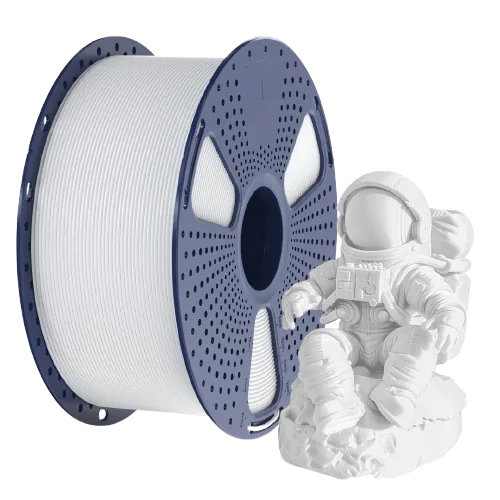
Cheap, consistent PETG for functional parts. Pairs well with the P2S enclosure and stock profiles.
Amazon →Affiliate links. We may earn a commission at no extra cost to you.