SUNLU S2 or S4? Choosing a Filament Dryer for Your Bambu Setup
Published · Comparison built on owner and reviewer reports, not sponsored by SUNLU
Snapshot: SUNLU specs and the Bambu wiki checked October 8, 2026, AMS prices from Bambu's US store as of October 7, 2026. Owner reports date from 2024 to 2026 and may describe older hardware revisions.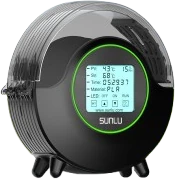
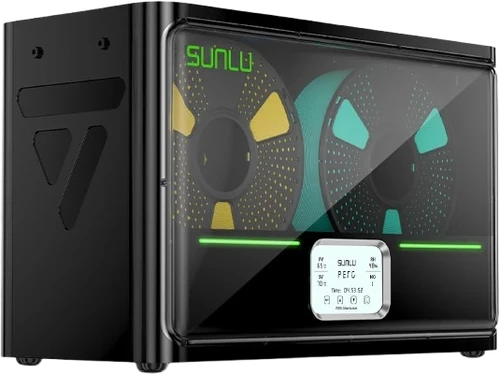
SUNLU FilaDryer S2 (left) and S4 (right), shown at the same height, not to scale against each other. Images: SUNLU (product images).
Short version
Get the S2 to dry one spool at a time and print straight from the dryer: most single-printer setups and TPU. Get the S4 to dry four spools at once, for example a full AMS lite set, if you can accept one shared temperature, a 460 mm (18 in) long box and fans reviewers call loud. SUNLU rates both for at most 70 °C: enough for PLA and PETG, just barely for TPU, but below the 75–85 °C Bambu recommends for ABS, ASA, PC and nylon. The most consistent owner advice for both: they do dry filament, but check temperature and humidity with your own thermometer or hygrometer instead of trusting the display.
Who each dryer is for
SUNLU FilaDryer S2
- Setting range 35–70 °C
- Filament holes 2, in the lid
- Fan 1 bottom fan (newer units)
- Fits best one printer, TPU
SUNLU FilaDryer S4
- Setting range 35–70 °C, one zone
- Filament outlets 8
- Humidity mode yes
- Fits best batches, AMS lite sets
- A1 or A1 mini without an AMS: Bambu says the open-frame P1P, A1, A1 mini and A2L cannot dry filament on the heated bed, so an external dryer is the way to dry unless you add an AMS 2 Pro or AMS HT. The S2 feeds the external spool path and keeps the spool warm for the whole print.
- TPU on any Bambu printer: Bambu says TPU 95A and softer cannot go through the AMS lite and recommends an AMS HT or a filament dry box.
- AMS owners: the original AMS and the AMS lite do not dry, so either unit works as a pre-dryer before spools go into the AMS, and the S4 can also feed an AMS lite directly. The S2 also handles a rescue spool or the odd TPU spool, printed straight from the dryer; the S4 a whole batch.
What owners report: SUNLU S2
The S2's best-known forum review is a 2024 bake-off against Creality's Space PI. Versions differ: one owner counts three, another says the first ones had no fan at all, and SUNLU's current page lists a bottom fan. A fan alone does not settle the complaints: the bake-off unit already had one.
Strengths
- It dries filament, says even the bake-off's author, who sent his unit back. One owner's PETG print came out "a lot better after 7 hours" at 70 °C.
- You can print straight from it, TPU included: one owner prints TPU-HF with the heater on, an A1 owner Overture TPU 95A from a SUNLU dryer box, and a member with four dryers runs TPU and ASA from it every time, PLA and PETG only on prints over four to five hours.
- Small and frugal: about 46 W heating and 2 W idle, per The 3D Printer Bee.
Weaknesses
- Humidity gets trapped. With the lid shut, the only openings are the two filament holes: an owner who opened his unit found no vent, just a blower moving the air inside. Owners prop the lid with a printed wedge; the designer of a popular MakerWorld gap spacer says humidity then drops below 20% during heating. One member says heat-only dryers like the S2 "don't work well and can even add water on humid days".
- The display temperature is optimistic in some units. In the bake-off, an owner's six thermometers peaked at about 60 °C over two weeks, never the displayed value or the 65 °C SUNLU advertised then, with up to 15 °C of difference across the chamber. A later owner logged a unit he calls an S2 Plus that never went above 37 °C while set to and showing 50 °C, and returned it; another member asked where his sensor sat. SUNLU now advertises 70 °C.
- Do not rely on the humidity readout: the bake-off found it about 15% off, and AndroidGuys (unit from SUNLU) calls the humidity sensor inaccurate.
- Top-heavy and light: the bake-off unit tipped over when the printer shook the table, and owners print stands for it. Feeding from the dryer can also pull it toward the printer when a roll ends, and the PTFE tube position for printing from it is a common complaint.
- Fan noise depends on the revision: The 3D Printer Bee calls its unit silent; owners of fan units report a whine, in one case even after lubricating the fan. Nobody we found published a decibel figure for the S2, so SUNLU's "less than 10 dB" stays unconfirmed.
What owners report: SUNLU S4
The S4 has fewer long-term forum reports and more review coverage; all four reviews cited here got their unit from SUNLU: 3DPrintBeginner and The Gadgeteer for free, Creality Experts as a pre-release sample, and First Quadcopter in a review collaboration that also brought four spools of filament.
Strengths
- Four spools and a storage mode: in SUNLU's humidity mode the S4 starts heating when chamber humidity reaches the set point (30–50%) and stops at 25%. A P1S owner feeds his printer from it through a 4-to-1 adapter as a "manual AMS".
- Close to the set point where measured: within about 2 °C near the top of the chamber for 3DPrintBeginner, within a couple of degrees at a PTFE opening for a forum owner.
- Better prints: filament prints better after six hours in it, says even an owner who distrusts its readouts.
Weaknesses
- One temperature for all four spools: owners who mix materials keep PLA apart, and First Quadcopter damaged a low-melting PCL spool loaded by mistake.
- A hot spot above the bottom fan warps self-printed PLA spools, one after a single hour; another owner reports the same.
- Uneven heat: with the display at about 50 °C, one owner's data logger showed peaks from 48 to 59 °C across the box, and he says his unit does not reach 70 °C at the 70 °C setting.
- Noise: 3DPrintBeginner finds the fans "a bit noisier than I would like", First Quadcopter calls the S4 "pretty loud regardless" of the load, and The Gadgeteer's reviewer would not run it during a video call. A forum owner: "Noisy, noisy, noisy".
- Not a sealed dry box: 3DPrintBeginner found the humidity back at room level the morning after a run; First Quadcopter calls it relatively airtight.
- Size and power: Creality Experts name its size as the main downside, and 3DPrintBeginner measured up to about 295 W.
How far 70 °C gets you
Bambu's drying table gives values for a forced-air ovenAn oven with a fan for even heat; Bambu's reference.. Against those values:
| Material | Bambu oven value | S1 Plus | S2 / S4 | AMS 2 Pro | AMS HT |
|---|---|---|---|---|---|
| PLA | 50 °C, 8 h | reaches it | reaches it | yes | yes |
| PETG | 60–65 °C, 8 h | below | reaches it | yes | yes |
| TPU | 70 °C, 8 h | below | at the limit | may not fully dry (Bambu) | yes |
| ABS, ASA | 75–85 °C, 8 h | below | below | not compatible in Bambu's table* | yes |
| PC, PA (nylon) | 75–85 °C, 8 h (PA 8–12 h) | below | below | not compatible in Bambu's table* | yes |
Bambu Lab drying table and AMS drying guide. *Bambu's own pages differ: the drying table lists ABS, ASA, PC and PA as not compatible with the AMS 2 Pro, while its drying guide says all filament types can be dried and recommends the AMS HT above 65 °C. "Reaches it" compares the manufacturer's highest setting with Bambu's value; it says nothing about how even the heat is inside a given unit.
Two things soften the "below" cells. SUNLU's own recommendations for the S4, as reproduced by 3DPrintBeginner, are lower than Bambu's across the board (45–50 °C for PLA and PETG, 60–70 °C for PA and PC). And owners who print nylon composites report that 70 °C works if you give it time: up to 24 hours for PAHT-CF in an S4. An S2 owner who prints PA6-CF and PAHT-CF straight from the heating dryer advises the opposite of the gap-spacer crowd: no gap at the lid, run until the readout shows 20% or less, and set the timer to 99 hours so it does not switch off early. But CNC Kitchen found carbon-fiber nylon still losing weight after 20 hours at 85 °C in an oven.
Keep printed spools out of the dryer
Bambu says not to dry filament on 3D-printed spools at all, because drying temperatures can soften or deform them. Bambu's own reusable spools are rated to 70 °C (low-temperature) and 90 °C (high-temperature).
Fit and settings on Bambu printers
Neither SUNLU dryer talks to the printer: both feed the external spool path, so the printer does not read the RFIDBambu spools carry a tag that the AMS reads to set filament type and color. tag, and you set type and color by hand.
| Your setup | How the dryer connects | Watch out for |
|---|---|---|
| A1, A1 mini without AMS | External spool: PTFE tube into the toolhead | Open frame, so no bed drying (Bambu) |
| A1, A1 mini with AMS lite | S4 feeds the AMS lite; an S2 one slot | Heavy new spools can be too stiff to pull; AMS lite rated for 10–30 °C ambient (Bambu) |
| X1 and P1 series | AMS tube disconnected at the printer and "Enable AMS" unticked, or a 4-in-1 PTFE Adapter | Set the filament by hand |
| P2S, X2D, H series | 4-in-1 PTFE Adapter before the filament buffer (H2C: Adapter II) | Keeps tangle detection working (Bambu) |
| Original AMS | Pre-dry, then load the AMS, or feed from the dryer | No heater |
| AMS 2 Pro, AMS HT | They dry on their own | Only on a connected, powered-on printer; while printing only on H2D, H2S, P2S, X2D and A2L |
Per the Bambu Lab wiki pages under sources.
Settings owners and Bambu agree on
- Print from the dryer or seal the spool right away. Bambu says freshly dried filament at 55% room humidity reabsorbs enough moisture to hurt prints within 2 to 12 hours, and recommends storage below 20% (see AMS desiccant).
- Let the moisture out. Prop the S2 lid, the most common owner fix, and keep the S4's eight outlets open, per its manual as an owner relays it. A forum regular advises against ducting that exhaust into an AMS: it is room air plus the water from the filament.
Alternatives and where to buy
The S1 Plus is SUNLU's cheaper single-spool dryer: spools up to 210 mm across and 85 mm wide, two rollers for printing while drying (SUNLU).
One spool, 35–70 °C, prints while drying. The default pick for a single printer and for TPU.
Amazon →
Four 1 kg spools in one chamber at one temperature, 35–70 °C. For batches and AMS lite sets.
Amazon →
One spool, 35–55 °C. Enough to rescue damp PLA, too cool for PETG and TPU by Bambu's numbers.
Amazon →Affiliate links. We may earn a commission at no extra cost to you.
The S4 Pro, which Amazon may list as an S4 variant, is a different unit: two zones with separate temperature and time and up to 85 °C, according to SUNLU. Check which version you select; we have not collected owner reports on it.
Buying an AMS anyway? The AMS HT ($139 in Bambu's US store) holds one spool, reaches 85 °C and, per Bambu, has a separate TPU outlet. The AMS 2 Pro ($299) holds four spools and, Bambu says, reaches 65 °C only at a room temperature of 25 °C or more. On the P1S, P1P, X1C, A1 and A1 mini neither dries while printing yet; there, a SUNLU dryer is one way to keep a spool warm during a print. For the original AMS, SUNLU sells a heated replacement lid, the AMS Heater, which several forum owners are happy with (not one of our picks).
Common questions
Can the SUNLU S2 or S4 dry nylon, PC, ABS or ASA?
Not to Bambu's numbers: SUNLU rates both for at most 70 °C, below the 75 to 85 °C Bambu recommends. Some owners still dry PA-CF at 70 °C with long run times, but for frequent use a dryer that reaches 85 °C, such as Bambu's AMS HT, fits better.
Can the SUNLU S4 feed an AMS lite?
Yes: one owner bought an S4 to try it and had to raise his A1 because the included PTFE tubes were at the end of their length, and another has run it "like a charm" for months. The S4's passive rollers leave all the pulling to the AMS lite, and heavy new spools can be too stiff.
Related: Best filament dryers for Bambu printers · Materials guide · AMS jamming · All reviews
Sources
- Bambu Lab: wiki pages on filament drying, the AMS 2 Pro and AMS HT drying function and FAQ, AMS compatibility (which AMS units the A1 series takes), AMS lite FAQ, AMS introduction, switching from AMS to the spool holder, 4-in-1 PTFE Adapter, A1 external spool, TPU printing, sealed box storage, the reusable spool and spool temperature ratings, all checked October 8, 2026; Bambu US store pages for the AMS HT and AMS 2 Pro.
- SUNLU (manufacturer claims): product pages for the S2, S4, S4 Pro, S1 Plus and AMS Heater, checked October 8, 2026; Amazon listings for the 35–70 °C range and the S4's 460 mm length.
- Review sites: 3DPrintBeginner (S4 sample from SUNLU), Creality Experts (S4 pre-release sample from SUNLU), First Quadcopter (S4 from SUNLU in a review collaboration, with four free spools), The Gadgeteer (S4 sample from SUNLU), The 3D Printer Bee (S2), AndroidGuys (S2 sample from SUNLU), CNC Kitchen (drying methods).
- Bambu Lab forum: S2 bake-off thread 67986 (posts 1, 24, 52), S2 owner thread 82516 (posts 5, 21, 23, 29, 33, 74), S4 threads 91416, 98468, 133900 and 99891, plus single posts linked in the text. MakerWorld: S2 gap spacer.
No affiliate or sponsorship relationship with SUNLU. Amazon links are affiliate links; Bambu store links are plain links. Specs and prices change, verify before buying.