A1
Best valueThe A1 Mini with room to grow. Same easy setup, same print quality, but 256mm of build volume instead of 180mm. The sweet spot for most beginner-to-intermediate users.
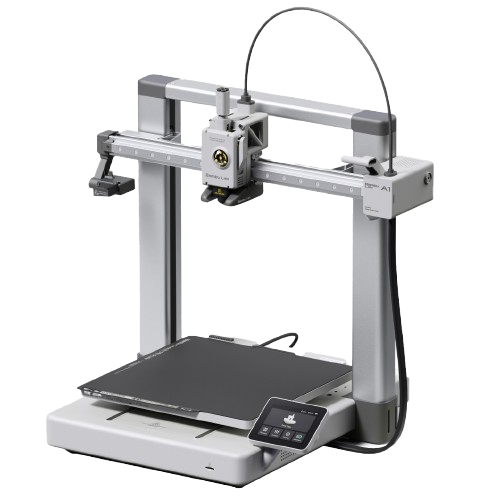
Image: Bambu Lab.
Should I buy the A1?
Yes, if you want more print volume than the A1 Mini for $90 more. The 256mm build covers most hobby use cases comfortably, and the AMS Lite combo at $399 is the cheapest Bambu multi-color combo with a bed of 256mm or more (only the smaller A1 Mini Combo, $315.50, costs less).
Who should buy the A1?
- PLA and PETG hobbyistGood fit
Bambu rates PLA, PETG, TPU and PVA as ideal, and 256 × 256 × 256 mm is the same build volume as the P1S, P2S and X1 Carbon. A1 vs P2S → (Bambu A1 specs) - MulticolorGood fit
One AMS lite adds four colors, or the A Series AMS Hub (sold separately) connects up to four AMS, AMS 2 Pro or AMS HT units instead. A1 vs P1S → (Bambu wiki) - ABS, ASA and engineeringLook elsewhere
The bed reaches 100°C, but Bambu rates ABS, ASA, PC, PA and fiber-filled filament as not recommended on the open A1; the enclosed P2S handles them. A1 vs P2S → (Bambu A1 specs) - Upgrading from the A1 miniGood fit
Same open design, materials and AMS options, with 256 × 256 × 256 mm instead of 180 × 180 × 180 mm and a 100°C bed instead of 80°C. A1 vs A1 mini →
Known issues
- US recall: A1 printers sold before January 30, 2024 (letter A as the sixth digit of the serial number) can have a damaged heatbed cable; Bambu offers a refund or a replacement heatbed and cable. Check the serial number on a used A1. (Bambu recall notice)
- Updating offline from 01.04.00.00 or older to 01.08.01.00 can show garbled text; Bambu's fix is to run the offline update again or connect the printer to the network. (Bambu release notes)
- Only one AMS lite per printer, and it cannot be combined with the AMS, AMS 2 Pro or AMS HT. (Bambu wiki)
Known issues only from Bambu's own wiki, firmware release notes, FAQ, blog and recall pages, checked October 2, 2026. Specs: our table below and Bambu's spec pages.
| Motion & Print | |
|---|---|
| Build volume | 256 × 256 × 256 mm (10.1 × 10.1 × 10.1 in) |
| Max speed | 500 mm/s |
| Acceleration | 10,000 mm/s² |
| Motion system | Bed-slinger |
| Layer height (0.4 mm nozzle) | 0.08–0.28 mm (Bambu Studio default range) |
| Extruder | Direct drive |
| Nozzle (stock) | 0.4mm stainless steel |
| Temperature & Features | |
|---|---|
| Nozzle max | 300°C |
| Bed max | 100°C |
| Enclosure | No |
| Heated chamber | None (open) |
| Bed surface | Textured PEI (magnetic) |
| Auto leveling | Yes (strain gauge) |
| Vibration comp. | Yes |
| Flow calibration | Yes (automatic) |
| HEPA / carbon filter | No |
| AMS | AMS Lite (4 colors); AMS, AMS 2 Pro or AMS HT via A Series AMS Hub (up to 4 units) |
| Camera | Built in, low frame rate (up to 1080p), timelapse |
| Display | 3.5" touchscreen |
| Connectivity | Wi-Fi 2.4 GHz, Bambu-Bus, microSD card |
| Machine dimensions | 465 × 410 × 430 mm |
| Weight | 8.3 kg |
| Power supply | 100–240V AC, max 1300W at 220V / 350W at 110V |
| Noise level | Under 48 dB in Silent Mode (Bambu) |
The A1 is the A1 Mini with a bigger plate and a slightly higher price. Everything good about the Mini translates directly: auto-calibration, reliable first prints, good ecosystem integration, and AMS Lite for multi-color. The 256mm build volume is the standard Bambu footprint shared with the P1S, P2S, and X1C, a practical size that handles most hobby printing comfortably.
The AMS Lite combo at $399 is the cheapest way into Bambu's multi-color ecosystem with a bed of 256mm or more; only the smaller A1 Mini Combo ($315.50) costs less. Still no enclosure, so ABS and ASA are off the table even though the bed reaches 100°C. If you need engineering materials, spend more on the P2S.
Pros
- Excellent out-of-box experience
- 256mm build volume covers most use cases
- Full auto-calibration suite
- AMS Lite combo makes multi-color accessible
- Good Orca Slicer integration (LAN+Dev mode)
- Compact for its volume
- Active community, lots of help available
Cons
- No enclosure. ABS/ASA not reliable
- AMS Lite holds 4 spools; full AMS types need the separate A Series AMS Hub and cannot be mixed with it
- Camera is low frame rate, not a live video feed
- No activated carbon filtration
- Cloud-dependent by default (workaround exists)
| Material | Support | Notes |
|---|---|---|
| PLA / PLA+ | Native | Excellent. Default material. |
| PETG | Native | Works well. Use glue stick on PEI to prevent over-adhesion. |
| TPU (90A–95A) | Supported | Direct drive handles TPU. Print at about 35–40 mm/s (Bambu Studio's Generic TPU profile caps flow at 3.2 mm³/s); TPU 85A is not compatible with the A1 series. |
| PLA-CF / PLA-GF | Not recommended | Bambu's rating for fiber-filled filament on the A1. Abrasive: if you try it, swap to a hardened nozzle first. |
| ABS | Not recommended | Warping without enclosure. |
| ASA | Not recommended | Same as ABS. |
| PA / Nylon | Not recommended | Bambu's rating for the A1 (PA and PC). |
First boot: Run auto-calibration before your first print (~10 minutes). Sets vibration compensation and flow correctly.
LAN mode: Enable LAN Only + Developer Mode in Settings for Orca Slicer. Use the access code and local IP.
Bed adhesion: Textured PEI grips PLA without glue. Clean with IPA before printing. For PETG, use glue stick as release agent.
AMS Lite: Start with one spool, add AMS Lite when you want multi-color. It connects easily after the fact.
A1 or A1 Mini? Mini for small prints under 180mm. A1 if you're unsure or want headroom. The $90 difference ($299 vs $209) is worth it.
A1 or P2S? Same build volume, but the P2S ($549) is enclosed, 600 mm/s, and has an activated carbon filter. Get the P2S if you want ABS/ASA. Get the A1 if you only print PLA/PETG and want to spend less.
Can the A1 use the full AMS? Yes, with the A Series AMS Hub (sold separately) and firmware 01.07.00.00 (October 2025) or later: up to four AMS, AMS 2 Pro or AMS HT units in any combination; select the type under Settings → AMS Options → AMS Type. The AMS Lite cannot be combined with them. Needs Bambu Studio 2.3.0 and Bambu Handy 3.8.0 or later.
Orca Slicer? Yes. Enable LAN + Developer Mode, connect via IP. Works fully with the A1.
Starter accessories for the A1
What we would add to a new A1 in the first month.
Double-sided 257 mm plate that fits the A1. Smooth side for glossy bottoms, textured side for easy release.
Amazon →Keeps PETG from over-bonding to the A1's textured plate and helps tricky first layers on large flat parts.
Amazon →Fits the A1's quick-swap hotend. Swap one in before printing CF or GF blends, which wear out the stock nozzle in hours.
Amazon →
The open-frame A1 exposes filament to room humidity. A dryer keeps PETG and TPU printing cleanly.
Amazon →Affiliate links. We may earn a commission at no extra cost to you.