How to Store, Dry and Handle Filament on a Bambu Printer
Where opened spools should live, which filaments need drying, how to dry them on the hardware you already have, and how to keep spools from tangling. The drying and storage numbers all come from Bambu's own guides.
Short version
Keep opened spools sealed with desiccant, ideally below 20% relative humidity. Room air sits at 45 to 65%; at about 55%, freshly dried filament is damp again within 2 to 12 hours.
Crackling at the nozzle, stringing or rough surfaces mean the spool has taken on water. It is not lost: dry it with the settings in Table 1. Only nylon left in open air for months gets very hard to dry.
A fresh spool of PLA can generally go straight from the bag. Bambu requires drying first for TPU, nylon (PA), PC, PET-CF, PVA, PETG HF and PLA Wood. The AMS 2 Pro and AMS HT dry spools themselves; bed drying works only on enclosed printers, not on the A1, A1 mini, A2L or P1P. Without one of those AMS units, a separate dryer is the usual route on an open printer: one rated for 70°C, such as SUNLU's S2, handles PLA, PETG and, at the limit, TPU.
- target humidity for stored filament, in % RH
- <20
- hours until dried filament is damp again in room air at about 55% RH
- 2–12
- top drying temperature in Celsius, AMS 2 Pro and AMS HT
- 65° / 85°
- Title
- How to Store and Dry Filament on Bambu Printers
- Section
- Guides
- Published
- Type
- Materials, storage
- Sources
- Listed under the article
- Page
- Status
- Not affiliated with Bambu Lab
Where opened spools should live
Filament pulls water out of the air. Bambu puts typical indoor air at 45 to 65% relative humidity (RH), higher in humid weather, and says most filaments stay dry only below 20% RH, the lower the better. Even there the clock runs: at 20% RH, most filaments stay dry for 2 to 7 days, depending on how hygroscopic the material is. In a room at about 55% RH, freshly dried filament takes up enough moisture to hurt print quality within 2 to 12 hours. So the job is less about drying and more about keeping dry filament dry.
- Typical indoor air: 45 to 65% RH. Ranges depend on how hygroscopic the filament is. Time axis logarithmic, broken after 7 days.
- Source: Bambu Lab wiki, Filament Drying Recommendations (Appendix II) and Support Filament Usage Guide, checked October 29, 2026
Three places keep opened spools dry:
- A bag with desiccant. For spools outside an AMS, Bambu's advice is a sealed bag with desiccant inside and the excess air pressed out. A zip bag does the job if the original packaging is torn.
- A sealed box with a hygrometer. Bambu suggests a box of about 4 liters with enough active desiccant, and for nylon-type filaments a thermo-hygrometer inside; aim for a reading below 20% RH. To feed TPU straight from a box while it prints, Bambu's TPU guides use a larger 5.8-liter box with a printed spool holder, fed through the box's side opening. The same guides note that a TPU spool can grow from about 65.4 to 69.4 mm wide while it dries.
- A dehumidifier box for the long haul. For hygroscopic filament you will not touch for a while, Bambu recommends a dedicated dry box and points to storage designs on MakerWorld.
Wherever the spools end up, keep them cool, dry, out of direct sunlight and away from heat sources. A vacuum bag keeps dry filament dry, but it does not dry a wet spool; that takes heat, covered further down.
Is the AMS enough?
For filament you print every few days, mostly yes. Bambu describes the AMS housing as a gas-tight structure meant for storing filament. The original AMS keeps moisture out with a humidity sensor, two desiccant packs and silicone O-rings; the AMS 2 Pro and AMS HT close their air inlet and outlet whenever they are not drying. The AMS lite is the exception: it is an open design, and the filament sits in room air while it prints, which is why Bambu advises against PVA on it.
Any AMS stays dry only as long as its desiccant works. How to read the beads and dry them for reuse is in our AMS desiccant guide; the AMS models themselves are compared in our ecosystem overview.
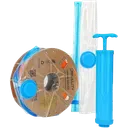
Creality Vacuum Storage KitWe use it
Vacuum bags with desiccant for spools you are not printing this week. We use them as a budget option: they keep dry spools dry, they do not dry a wet one.
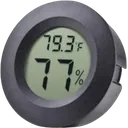
Veanic Mini HygrometerWe use it
Fits the round 46 mm slot in popular AMS dry-pod prints, so you read the humidity in a box instead of guessing. At about ±5% RH it shows the trend, not a lab value.
Links to Amazon are affiliate links. We may earn a commission at no extra cost to you.
Which filaments need drying
Bambu rates every filament on two questions: does it need drying before use, and does it need desiccant protection while it prints. In Bambu's drying guide the two answers go together: where it requires drying, it also requires desiccant while printing; where drying is only recommended, desiccant is too. Table 1 puts that rating next to the drying settings for each route you have. The rest of this guide refers back to it; print settings for each material are in our materials guide.
| Filament | Dry before use | Forced-air oven | AMS 2 Pro | AMS HT | Heated bed, enclosed printers |
|---|---|---|---|---|---|
| PLA Basic, Matte | Recommended | 50°C, 8 h | 45°C, 12 h | 45°C, 12 h | 60–70°C, 12 h |
| PLA Silk | Recommended | 55°C, 8 h | 45°C, 12 h | 45°C, 12 h | 65–75°C, 12 h |
| PLA-CF, PLA-GF | Recommended | 50–60°C, 8 h | 45°C, 12 h* | 45°C, 12 h | 65–75°C, 12 h |
| PLA Wood | Required | 55–65°C, 8 h | 45°C, 12 h | 45°C, 12 h | 70–75°C, 12 h |
| PETG, PETG-CF | Recommended | 60–65°C, 8 h | 65°C, 12 h* | 65°C, 12 h | 75–85°C, 12 h |
| PETG HF† | Required | 65°C, 8 h | 65°C, 12 h | 65°C, 12 h | Not listed |
| ABS, ASA | Recommended | 75–85°C, 8 h | Not compatible | 80°C, 8 h | 90–100°C, 12 h |
| TPU 85A, 90A | Required | 70°C, 8 h | 65°C, 12 h* | 75°C, 18 h | 90°C, 16 h |
| TPU 95A HF, TPU for AMS | Required | 70°C, 8 h | 65°C, 12 h* | 75°C, 18 h | 80–90°C, 12 h |
| PC | Required | 75–85°C, 8 h | Not compatible | 80°C, 8 h | 90–100°C, 12 h |
| PA6-CF/GF, PAHT-CF/GF | Required | 75–85°C, 8–12 h | Not compatible | 85°C, 12 h | 90–100°C, 12 h |
| PET-CF | Required | 80°C, 8–12 h | Not compatible | 80°C, 12 h | 90–100°C, 12 h |
| PVA | Required | 75–85°C, 8–12 h | Not compatible | 85°C, 18 h | 90–100°C, 12 h |
Values from Bambu's drying guide (Appendix I, edited July 31, 2026). Required: dry the spool before you print it. Recommended: dry it whenever you are not sure it is dry; for PLA, Bambu adds that a fresh spool can generally go straight from the bag. On the bed, flip the spool halfway through.
Not compatible: the guide's verdict for the AMS 2 Pro, which tops out at 65°C. Bambu's filament table says “not recommended”, and the store lists these filaments with the note that the AMS 2 Pro cannot dry them completely. *The store's list also includes TPU for AMS and Bambu's PLA-CF and PETG-CF, though the guide gives AMS 2 Pro settings for them; for TPU, the guide itself warns that the AMS 2 Pro may not dry it fully and points to the bed or the AMS HT.
†PETG HF is not in the drying guide. Its values come from Bambu's filament table (edited October 14, 2026), which rates it, like PETG Translucent, as required and gives no bed setting. That table differs from the guide in places, for example PLA at 55°C and PETG at 70°C in the oven and PLA Wood only “recommended”; elsewhere we follow the guide.
A few materials need more than a number:
- PLA. A fresh spool can generally go straight from the bag without drying. The exceptions are PLA Silk and Silk+, PLA-CF and PLA Wood.
- Nylon (PA). Left in open air for about three months, PA-type filaments take up so much water that a convection oven at 80 to 90°C, within the spool's heat limit, can barely dry them. Keep them sealed between prints. More on printing them in our engineering materials guide.
- PC. Repeated heat-and-cool drying cycles can make PC filament brittle. Bambu says the printed parts are not weaker for it, but the filament is more likely to snap while it feeds. Dry it once, keep it sealed with desiccant, and the next print may need no drying or only a short one.
- Nylon and PC on the spool holder. Bambu warns that both take up moisture within hours in humid air: never leave them on the holder overnight.
- PVA and support filaments. Bambu calls Support for PLA, Support for PLA/PETG, Support for PA/PET and PVA highly hygroscopic: dry them thoroughly before printing and reseal them with desiccant right after. PVA stays dry for about 1 to 3 days at 20% RH and is damp again within 1 to 3 hours at around 55%, so put it into a dry box or AMS straight from the dryer, without letting it cool first. Neither the AMS 2 Pro nor the AMS HT can feed damp PVA or BVOH, so dry it first; in an AMS HT that takes 85°C for 18 hours.
- TPU. Most TPU cannot go through an AMS; how to feed it from a dry box or an AMS HT is in our Overture TPU guide.
Signs your filament is wet
Water in the filament boils off in the hot nozzle. The melt expands, extrudes unevenly and forms bubbles; Bambu lists stringing, oozing, holes, rough surfaces and lower strength as the result, and its filament table adds under-extrusion. What to look and listen for:
- Crackling or popping at the nozzle. Bambu's own rule: if you hear it, the filament has taken on moisture. Dry it before the next attempt.
- Rough, bubbly or stringy surfaces. Same source, same verdict. Stringing has other causes too; our stringing guide goes through them.
- Thin, gappy walls. Wet filament is one cause of under-extrusion; the others are in our under-extrusion guide.
- Weak parts and splitting layers. Moisture lowers strength; for layers that come apart, see layer splitting.
Not sure? Bambu's test: in Bambu Studio, right-click the plate, add a standard model and print it. Obvious stringing means the filament needs drying. Drying is a test as much as a fix, though: if a spool dried by the numbers in Table 1 still prints the same defect, the cause is somewhere else.
The AMS humidity reading is not a drying alarm
Bambu says so in its FAQ: the number shows how the filament is stored and how well the AMS seals, not when to dry. Decide by material instead, using Table 1. The original AMS shows levels from A (dry) to E (humid); at C or above, check the seals and replace the desiccant. The AMS 2 Pro and AMS HT show relative humidity in percent, on the printer screen, in Bambu Studio and in Bambu Handy. If that number climbs right after a drying cycle, that is normal: the chamber cools down, and relative humidity rises as it does, without any water coming in.
Have to print damp PETG HF now? Bambu's stopgap is the Generic PETG HF profile, which runs at 220°C and 16 mm³/s for exactly that case. Do not raise the speed, and switch back to the Bambu PETG HF profile once the spool has been dried at 65°C for 8 hours.
Drying on Bambu hardware
You have up to five ways to dry filament with or around your printer. Table 2 lists them with their limits; the settings per filament are in Table 1.
| Route | Top temperature | Works with | Watch out for |
|---|---|---|---|
| AMS 2 Pro | 65°C, reached only at a room temperature of 25°C or more | H2 series, P2S and X2D power one unit for drying; on X1, P1, A1 and A2L printers every unit needs a switching adapter (A1 and A1 mini connect through the A Series AMS Hub) | Bambu's store says it cannot fully dry ABS, ASA, PET, PA, PC, PVA, BVOH, POM, HIPS, TPU for AMS or Bambu's PLA-CF, PAHT-CF and PETG-CF; take PLA and TPU out when drying PETG or ABS |
| AMS HT | 85°C, held at a room temperature of 10 to 25°C | Dries only on its own power cord; the printer cannot power it for drying | PVA, PPS-CF and PPA-CF may not dry fully; soaked filament can cause condensation |
| Heated bed under a cover | Per Table 1 | H2 series, X1 series, X2D and P2S with Bambu's drying routine; P1S with manual settings. Not A1, A1 mini, A2L or P1P | Unload the filament first, cover the spool, flip it halfway; some third-party spools warp |
| Forced-air oven | Per Table 1 | Any spool that takes the heat; Bambu's reusable spools are rated to 70 or 90°C | At least 250 × 250 × 90 mm per spool; no kitchen oven, no microwave |
| Separate filament dryer | Per model: 70°C for SUNLU's S2 and S4, 55°C for its S1 Plus | Any printer, the open-frame ones included; SUNLU's units feed the printer while they dry, the S4 up to four printers at once | At 70°C: PLA, PETG and, at the limit, TPU by the oven values in Table 1, not ABS, ASA, PC, nylon, PET-CF or PVA at 75 to 85°C; the S1 Plus covers PLA only. For any other dryer, compare its maximum with Table 1 |
AMS 2 Pro and AMS HT
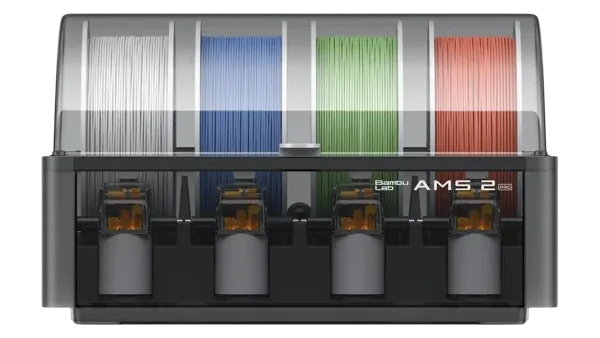
Both units dry the spools they hold. The order that avoids the common mistakes:
- Set the filament typeSpools without an RFID tagThe chip on Bambu spools that lets the printer recognize the filament and load its settings automatically. Third-party spools usually have none, so you set the type by hand., and without a type set by hand, show a “?” in the AMS and dry with PLA settings. Tap Edit or Re-read before you start.
- Take out what cannot take the heatDrying PETG or ABS goes past the softening point of PLA and TPU, so take those spools out first or they deform. When you dry PLA, everything else can stay in.
- Let the spool rotateRotating-spool drying is Bambu's recommended mode: pull the filament back out of the feeder, stow the end on the spool and check “Rotate spool while drying”. The spool then turns 30° every 5 minutes. Static drying is not for PLA, PVA, Support for PLA/PETG or TPU, whose windings can stick together or deform; on an H2D with firmware 01.03.00.00 or later, PLA and TPU can also dry without rewinding or rotation.
- Close the lid and startOpen the Drying & Humidity page on the printer, choose the parameters from Table 1 and start. The AMS runs a self-check, then counts down.
- Keep it closed afterwardsDried filament goes straight back into the closed AMS or a sealed box with working desiccant, and gets printed soon.
Limits, power and remote drying
Know the limits. Table 2 has the short version; two details matter in practice. The AMS 2 Pro reaches its 65°C only in a room at 25°C or warmer, while the AMS HT holds 85°C with its 170 W heater down to 10°C. And with soaked filament such as PVA, condensation can form inside the AMS HT: open the lid briefly to let the steam out.
Power. An H2-series printer, a P2S or an X2D powers one AMS 2 Pro for drying; every further unit needs its own switching adapter. On X1, P1, A1 and A2L printers, every AMS 2 Pro needs one. The AMS HT dries only on its own power cord.
Remote drying, and printing while drying. The Device page in Bambu Studio and Bambu Handy can start and stop drying. Bambu lists the minimum firmware for it: H2D 01.03.00.00, H2S and P2S 01.02.00.00, X2D and A2L 01.01.00.00; other printers get it in later updates. The same firmware lets the AMS keep drying while it feeds a print. It lowers the temperature below the softening point of what is in it: 45°C whenever PLA is printed or dried, 55°C when PETG is. The P1S, P1P, X1C, A1 and A1 mini do not support that yet.
On the heated bed
Bed drying uses two things a printer already has: the heated bed warms the spool, and the closed chamber keeps the heat around it.
Before you start
The A1, A1 mini, A2L and P1P cannot dry filament on the bed: Bambu rules it out because they are open-frame printers. Use an AMS 2 Pro, an AMS HT or a separate dryer instead.
The steps below are Bambu's routine for the H2 series, X1 series, X2D and P2S. The P1S has no drying function: home it, lower the bed all the way, set the bed temperature by hand (Bambu's example is 100°C for ABS) and time it yourself. On an X1 or X1C, keep the top cover and the front door closed for the whole run. Some third-party spools are not heat-resistant enough and can warp.
- Unload and clearUnload the filament from the toolhead, or it can soften inside the extruder and clog. Clear the space above and below the build plate.
- PrepareTap Prepare on the screen; the toolhead and the bed move into position.
- Cover the spoolLay it on the plate under a cover printed from PA-CF or PC (Bambu publishes a Filament Drying Cover model) or under the filament's own cardboard box.
- Set and startChoose the filament type, bed temperature and time, then start. Flip the spool halfway through, wearing gloves.
- Cool and storeSet the bed to 0°C, wait until the spool is no longer hot to the touch, then store it sealed straight away.
Oven or separate dryer
If you use an oven, make it a forced-air convection oven, with the spool away from the heating elements. A Bambu reusable spool is 200 mm across and 67 mm high, so the oven needs at least 250 × 250 × 90 mm of space per spool. No microwave and no kitchen oven: the heat is too uneven, and the areas near the heating elements can ruin spool or filament.
On an A1, A1 mini, A2L or P1P without an AMS 2 Pro or AMS HT, a separate dryer is the main way to dry filament, and what any dryer can dry depends on its top temperature against the oven values in Table 1. SUNLU rates its S2 and the four-spool S4 for 70°C, enough for PLA, PETG and, at the limit, TPU; the S1 Plus is rated for 55°C, which covers PLA only. None of them is rated for the 75 to 85°C that ABS, ASA, PC, nylon, PET-CF and PVA need, although SUNLU calls 70°C suitable for PA and PC and its manuals suggest lower settings than Bambu's for most materials; we go by Table 1.
All three feed the printer while they dry; on an A1 or A1 mini, fix the PTFE tube at both ends and keep it short and free of sharp bends, or tangle detection can pause the print (see Tangles). Our filament dryer guide compares the options, and SUNLU S2 or S4 covers one spool versus four.
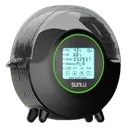
SUNLU FilaDryer S2We use it
One spool, up to 70°C per SUNLU, and it feeds the printer while it dries, so it works next to an A1 or a P1P; fix the PTFE tube at both ends. We use it and find it solid; for nylon and PC it stays below Bambu's 75 to 85°C.
Links to Amazon are affiliate links. We may earn a commission at no extra cost to you.
Which spool can go into the heat
Spool-less refills go onto a reusable spool before drying. Bambu's low-temperature reusable spool is rated to 70°C and meant for PLA and PETG; the high-temperature spool takes 90°C and covers PLA, PETG, ABS, ASA, PA6-GF, ABS-GF, PAHT-CF, PET-CF, PA6-CF, PC and TPU. Never dry filament on a 3D-printed spool: Bambu says the heat can soften or deform it.
Handling spools
Tangles can start before the first print. For a new spool, Bambu's beginner guide sets this order:
- Check the bagBefore opening, make sure the vacuum bag is intact and not leaking. Bambu's silver bags for engineering filaments can be resealed.
- Spool in first, tape off secondLeave the tapes on until the spool sits in the AMS. Taken off earlier, the filament can unwind, tangle and knot, and Bambu warns it will likely knot again even after you rewind it. Leave the RFID tag on the spool.
- Cut the end at an angleHold the end, release the tape that secures it and cut the tip at an angle, keeping tension on the filament while you cut.
Keep the end secured
A loose end tangles. The rule: the end is always fixed to the spool, and after a print it goes back onto the side of the spool before the spool goes into storage. Before each print, check the spool for tangles.
Refills
To put a refill on a reusable spool, open the spool, line up the notch in the cardboard core with the clip on the wide half, press the coil into place and close the spool. Peel the strap near the end, push the end into the round hole in the spool, then remove the rest of the strap. Wherever there is a gap between coil and spool wall, press the edge of the coil in by hand: that keeps it from tangling. Finally, replace the old label with the one that came with the refill.
Cardboard spools
The AMS, AMS 2 Pro and AMS HT take spools 50 to 68 mm wide and 197 to 202 mm across (Fig. 2). Bambu recommends plastic spools and strongly advises a spool adapter or adapter ring for cardboard ones, to cut down on slipping and debris inside the AMS. The AMS lite grips the spool at its center hole with a spring-loaded holder, which Bambu says suits paper spools better; it takes spools 40 to 68 mm wide with a 53 to 58 mm hole. Owner reports on cardboard spools, brand by brand, are in our third-party filament guide.
- Hub and winding drawn schematically. Dimensions in mm.
- Source: Bambu Lab store, AMS 2 Pro and AMS HT product pages; Bambu Lab wiki, Notes for AMS (original AMS), checked October 29, 2026
Tangles
On the A1 and A1 mini, tangle detection pauses the print when the feeding resistance gets too high. There are three triggers: a tangled spool, a spool lying on the table or in a dryer, and a PTFE tube that is too long or sharply bent. The detection does not work with TPU, TPE, wet water-soluble filament or PVA. If a spool does tangle, untangle it when it is light; when it is bad, cut the filament, tap Continue Printing and reload when the printer reports the runout. Error codes and stuck filament are covered in our AMS jamming and AMS detection guides.
A routine that works
- Before a print. Decide by material, not by the humidity number: Table 1 says what needs drying. Check the spool for tangles and that the end runs freely.
- Right after drying. Straight into the closed AMS or a sealed box with working desiccant, and print it soon. PVA goes in without cooling first.
- After a print. Secure the end on the side of the spool. Bag or box the spools you will not use for a while.
- Over the weeks. Original AMS at level C or above: check the seals and replace the desiccant. AMS 2 Pro or AMS HT reading high for a long time: run another drying cycle. Never leave nylon in open air for months, and keep PC sealed rather than drying it again and again. For the desiccant itself, see our desiccant rhythm.
Our take
Seal first, dry when the material calls for it. For PLA, and in our view for most PETG, a sealed bag or a closed AMS with working desiccant is usually all it takes, even though Bambu recommends drying PETG. A dryer earns its place with TPU, and with nylon, PC, PET-CF and PVA if it reaches 75 to 85°C, as the AMS HT and a forced-air oven do.
Common questions
Does PLA need to be dried?
Usually not. Bambu says PLA can generally be printed straight from the bag; Silk, CF and Wood variants are the exceptions. An opened spool that sat in room air for a while is a different story: if it strings or crackles, dry it at 50°C for 8 hours in a forced-air oven or at 45°C for 12 hours in an AMS 2 Pro or AMS HT.
What humidity should I store filament at?
Below 20% RH, Bambu says, and the lower the better. At 20% RH most filaments stay dry for about 2 to 7 days. Typical indoor air at 45 to 65% RH is too humid for storing opened spools.
Can I dry filament on the bed of my A1, A1 mini or P1P?
No. Bambu rules out bed drying on the open-frame A1, A1 mini, A2L and P1P. Use an AMS 2 Pro, an AMS HT or a separate dryer. The SUNLU S2, for example, is rated for 70°C, enough for PLA, PETG and, at the limit, TPU, and it feeds the printer while it dries; ABS, ASA, PC and nylon need 75 to 85°C.
Why does my AMS humidity reading go up right after drying?
Because the chamber cools down. Relative humidity rises as the air cools, even though no water has come in. Bambu calls this normal.
Can I print while the AMS 2 Pro or AMS HT is drying?
On the H2D (firmware 01.03.00.00 or later), H2S and P2S (01.02.00.00), X2D and A2L (01.01.00.00), yes. The AMS lowers its drying temperature while it feeds: to 45°C whenever PLA is printed or dried, to 55°C when PETG is. The P1S, P1P, X1C, A1 and A1 mini do not support it yet.
Can I dry a refill or a printed spool?
A refill, yes, once it is on a reusable spool: Bambu's low-temperature spool is rated to 70°C, the high-temperature one to 90°C. A 3D-printed spool, no: Bambu says the heat can soften or deform it.
Is the AMS enough to store filament?
For filament you print often, yes, as long as the desiccant works: Bambu describes the AMS housing as gas-tight and meant for storing filament. The open AMS lite is the exception. For spools you will not touch for weeks, a sealed bag or box with desiccant is the safer place.
Sources
25 sources, including Bambu Lab wiki, SUNLU and Bambu Lab store. Last checked October 29, 2026.
ShowHide
- Bambu Lab wiki, “Filament Drying Recommendations” (last edited July 31, 2026; read October 29, 2026)
- Bambu Lab wiki, “Sealed Box” (last edited May 22, 2026; read October 29, 2026)
- Bambu Lab wiki, “TPU Printing Guide” (5.8-liter box holder; last edited September 17, 2026; read October 29, 2026)
- Bambu Lab wiki, “TPU Printing Guide for X2D” (spool width after drying; last edited September 11, 2026; read October 29, 2026)
- Bambu Lab wiki, “Filament guide” material table (last edited October 14, 2026; read October 29, 2026)
- Bambu Lab wiki, “Beginner's Guide to Filaments Usage” (last edited July 28, 2026; read October 29, 2026)
- Bambu Lab wiki, “Support Filament Usage Guide” (last edited August 25, 2026; read October 29, 2026)
- Bambu Lab wiki, “AMS Humidity Detection Function” (last edited May 22, 2026; read October 29, 2026)
- Bambu Lab wiki, “Filament drying guide for AMS 2 Pro and AMS HT” (last edited August 17, 2026; read October 29, 2026)
- Bambu Lab wiki, “How to Use the AMS 2 Pro for Filament Drying With a Bambu Lab X1 and P1 Series” (last edited July 9, 2026; read October 29, 2026)
- Bambu Lab wiki, “Introduction to AMS HT Workflow and Features” (last edited May 11, 2026; read October 29, 2026)
- Bambu Lab wiki, “Introduction to AMS” (read October 29, 2026)
- Bambu Lab wiki, “Model Warping, Falling Off, or Collapsing” (moisture signs and the spool-holder warning; read October 29, 2026)
- Bambu Lab wiki, “Stringing and oozing” (read October 29, 2026)
- Bambu Lab wiki, “Printing method when PETG HF is not completely dried” (read October 29, 2026)
- Bambu Lab wiki, “Refill Filament with Bambu Reusable Spool” (last edited August 18, 2026; read October 29, 2026)
- Bambu Lab wiki, “Bambu Reusable Spool Model” (printed spools; read October 29, 2026)
- Bambu Lab wiki, “Notes for AMS” (spool size and cardboard spools; read October 29, 2026)
- Bambu Lab wiki, “Introduction to Filament Tangle Detection” (external spools, dryers and the PTFE tube; read October 29, 2026)
- Bambu Lab wiki, “How to Handle Tangled or Stuck Filament” (read October 29, 2026)
- Bambu Lab store product pages, specifications for the AMS 2 Pro, AMS HT and AMS lite (read October 29, 2026)
- SUNLU, “FilaDryer S2” product page and the user guide linked there (maximum 70°C, PA and PC claim, temperature reference; read October 29, 2026), plus the SUNLU store page (“Print and Dry Simultaneously”; read October 29, 2026)
- SUNLU blog, “SUNLU S2 vs S4 vs E2: Filament Dryer Comparison 2026” (the S2 holds one 1 kg spool; published February 25, 2026; read October 29, 2026)
- SUNLU, “FilaDryer S4” product page and the user guide linked there (four 1 kg spools, up to 70°C, feeding up to four printers; read October 29, 2026)
- SUNLU, “FilaDryer S1 Plus” product page and the user guide linked there (35 to 55°C, filament outlet to the printer; read October 29, 2026)