Overture TPU 95A on Bambu Printers: Settings, External Spool Setup and What Owners Report
Published · Filament review from owner reports, Bambu's documentation and Overture's data sheet, not sponsored
Snapshot: Bambu wiki, Bambu store and Bambu Studio presets checked October 8, 2026. Owner reports are linked where they appear; this is not a lab test.
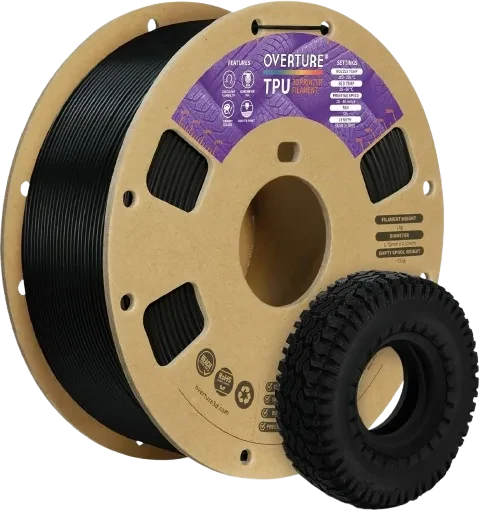
Overture TPU 95A, the standard version this guide covers. Image: Overture (product image).
Short version
Overture TPU 95A (the standard version, not Overture's High Speed TPU) is a manual-feed filament on Bambu printers: Bambu rules out the AMS, AMS lite and AMS 2 Pro for 95A TPU, and the AMS HT works only as a sealed box. Bambu's TPU guides feed 90A and 95A TPU from a sealed dry box or an AMS HT used as a box, set higher than the printer; many owners also run it from the open external spool holder. Start from Bambu Studio's Generic TPU preset, keep its speed limit and dry the spool. Owners on the A1, A1 mini, X1C and H2D report good prints from an external spool; the main complaints are stringing, which Bambu forum replies usually trace to moisture, and a handful of P1S extruders that would not feed it reliably.
A safe default 95A TPU, as long as it stays out of the AMS
Across the owner reports, it lands in the "just works" group on most of the Bambu printers people write about when it is dry, fed with little drag and printed slowly, which is why it is the TPU in our picks. P1S owners: read Weaknesses first.
Standard 95A TPU, 1.75 mm, 1 kg spool. For a dry box or the external spool, not for the AMS. Bumpers, seals, gaskets, grips.
View on Amazon →Affiliate link. We may earn a commission at no extra cost to you.
Who it is for
Overture TPU 95A sits in the middle of the TPU range: flexible enough for bumpers, seals and grips, stiff enough for a Bambu direct-drive extruder without extra hardware. Overture's data sheet lists a hardness of about Shore 95AHardness scale for flexible plastics: 95A feels like a firm phone case, 85A like a soft rubber band..
A good fit for single-color flexible parts from the external spool on any current Bambu printer, like the gaskets, grommets, caps and soft vise jaws one owner lists. Look elsewhere for TPU in the AMS, fast TPU or a much softer part (see Alternatives), and for grippy feet: one owner found it far less grippy than real rubber feet.
What owners report
From close to 50 Bambu forum threads and the most-used MakerWorld and Printables profiles; everything below is about the standard version unless it says otherwise. Overture's current data sheet (version 5.1, July 2024) calls it "TPU 2.0" and claims improved printability, so 2023 reports may describe an earlier version.
Strengths
- Stock presets often work: owners print it on default settings on an X1C, Generic TPU or Bambu's own TPU 95A preset.
- The A series is fine outside the AMS lite. An A1 owner feeds it from a dryer box; an A1 mini and P1S owner prints it on both, as long as it stays out of the AMS.
- It behaves on the H2D: one owner feeds it through the TPU inlet without problems, another prints it in mixed prints with ABS-GF without clogs.
Weaknesses
- Stringing, usually from moisture. The most common complaint; replies point to drying first. "It prints very nicely when dry," a long-time user writes.
- Feeding trouble on some P1S printers. One owner's dried spool (5 hours at 55°C, not weighed), fed from the rear spool holder on Generic TPU, made the extruder stutter and failed after two layers, yet printed on his Ender 3; replies suspected moisture and extruder tension. Two more P1S owners report jams or failed tuning (the second without naming the version); the A1 mini and P1S owner above has no trouble.
- Generic TPU is not enough for everyone. Two MakerWorld profile users, on the A1 series and the P1P, got poor results with it; Overture's own profile failed for the first.
- The AMS is a dead end. An X1C owner who read "compatible with X1C" in a listing as "works in the AMS" had to take the AMS apart, and an A1 extruded nothing through the AMS lite.
Fit on each Bambu printer
Bambu never names Overture in its documentation; the table applies its rules for 90A and 95A TPU to Overture's 95A.
Not through the AMS
Bambu's material table lists 95A TPU as too soft for the AMS and AMS lite feed path, and its TPU guide rules out the AMS 2 Pro. The AMS HT works only as a sealed box feeding from its rear TPU outlet. The only TPU Bambu allows through every AMS is its 68D TPU for AMS.
| Printer | Where the filament goes | Notes |
|---|---|---|
| A1, A1 mini | A dry box or the AMS HT's TPU outlet, raised above the extruder inlet and fed straight into it (Bambu disconnects one toolhead PTFE tube); owners also use the external spool | Unload by hand, the cutter cannot unload TPU. With an AMS lite attached, owners disconnect its tubes or use a Y-splitter and untick "Use AMS". |
| P1P, P1S | A dry box or an AMS HT beside the printer, outlet raised above it, PTFE tube to the toolhead; untick the AMS when sending the print | Bambu's P-series guide covers 90A; unload by hand. The rear spool holder is not a feed path in Bambu's TPU guide, and the failed P1S report under Weaknesses fed from it. |
| P2S | Spool holder base in the Standalone position, so the PTFE tube bypasses the filament buffer | Bambu advises against AMS-incompatible filament in the buffer. We found no Bambu forum reports on the P2S yet; MakerWorld has a 0.6 mm Overture 95A profile with good comments and P2S settings for TPU 2.0. |
| X1C, X1E | The PTFE coupler at the back (Bambu calls it the air assist tube coupler); Bambu loads at 250°C, slowly | No automatic unloading. |
| X2D | Main (left) nozzle only; for its 95A HF, Bambu moves the spool base to the right and runs a roughly 175 mm PTFE tube to the left extruder inlet | TPU on the auxiliary nozzle is not supported. No owner reports yet. |
| H2D, H2S, H2C | PTFE tube into the dedicated TPU inlet at the back; on the H2D and H2C, the right hotend | Bambu's guide shows the H2D and says the H2S and H2C feed the same way (the H2D Pro is not named). A top-feed rack has the least friction if the rear inlet gives trouble. No owner reports on the H2S. One H2C owner had every 0.4 mm nozzle clog with Overture 95A right before the print started, with or without the Feed Assist Module; with a shorter custom start G-code the clogging "seems" to have stopped for him, though he wrote that he still needed more prints to know whether it is reliable. |
| A2L | The AMS HT's TPU outlet or a 5.8 L dry box, fed directly into the extruder | Bambu's A2L guide covers 90A and 95A HF. |
The TPU Feed Assist Module lowers feed resistance for TPU up to 95A HF on the H2, X1, X2D, P1 and P2S (a standalone P2S needs the separately sold buffer), not the A series. Any Bambu plate except the Cool Plate SuperTack works; Bambu's A-series and X2D guides want glue except on Textured PEI, and owners mostly glue the Engineering Plate or Smooth PEI so parts come off. Skip 0.2 mm nozzles; Bambu recommends a new nozzle or a cold pull (a nozzle cleaning) first.
Settings in Bambu Studio
Bambu Studio has presets for Overture PLA but none for Overture TPU (Bambu Studio repository, checked October 8, 2026). What matters most is the max volumetric speedThe most filament per second the slicer lets the hotend melt; Bambu Studio slows the print to stay under it., which caps how fast the print can run.
| Starting point | Speed limit | Nozzle | Retraction | Notes |
|---|---|---|---|---|
| Generic TPU (Bambu Studio) | 3.2 mm³/s | 240°C, 230°C on H2S and H2C | 0.4 mm on most printers | The default most owners use. Plate 35°C on most printers, 45°C on the A1 and P1P, 30°C on the A1 mini and A2L. |
| Bambu TPU 95A (Bambu Studio) | 3.6 mm³/s | 230°C | 0.4 mm (X1C preset) | Bambu's own standard 95A; one owner uses it for Overture 95A. |
| Overture's guidance | 20 to 30 mm/s (settings guide), 20 to 40 mm/s (product FAQ); the spec block on the same product page says under 250 mm/s and the TPU 2.0 data sheet under 200 mm/s | 210 to 240°C, start at 225°C | 0.5 to 1.5 mm at 20 to 30 mm/s (guide); "off or minimal" (FAQ) | Overture's speed figures contradict each other; the preset's max volumetric speed caps the real speed anyway. Bed 35 to 50°C (product page), 25 to 60°C (data sheet). |
| Bambu TPU 95A HF (Bambu Studio) | 12 mm³/s | 230°C | 0.8 mm | For Overture High Speed TPU only (see below). |
Bambu's tuning rules for TPU
- Turn off flow dynamics calibration before printing TPU.
- Keep the preset's speed limit; do not raise the max volumetric speed or print speed.
- For stringing: print by object, lower the nozzle by about 5°C and the max volumetric speed by 0.4 mm³/s, raise retraction by 0.2 mm, dry the filament.
- For under-extrusion: slow down, check that the spool turns freely, dry the filament and clean the nozzle with a cold pull.
- Set the spool up high. Bambu suggests raising the dry box or AMS HT so its outlet sits above the extruder inlet and loose filament is not caught by the heated bed or nozzle.
What owners change
Temperature is the setting owners disagree on most: an X1C owner fixed most of his poor prints with a nozzle 10°C cooler, slower speed and acceleration, 3.2 mm³/s and 1 mm retraction, an A1 mini owner reports cleaner, faster prints with a lower-temperature forum preset, others stay at 240°C nozzle and 35°C bed. Community profiles exist for the A1 series, P1P, P1S, X1C and P2S (we have not opened their files); with one at 240°C, an X1C owner reports almost no stringing. A Printables P1P profile for black Overture TPU draws mostly positive comments, though one user says importing it overwrote his existing profiles.
Dry it, and give the spool room
Overture says 70°C for 7 hours (product page) or 8 hours (data sheet). Bambu dries its own TPU at 70°C for 8 hours in a forced-air oven, 75°C for 18 hours in the AMS HT or 80 to 90°C for 12 hours on the bed of an enclosed X-series, P1S, P2S or H2 printer, and warns that the AMS 2 Pro may not dry TPU fully. Dry new spools too: an owner who weighs his spools says fresh ones from the vacuum bag commonly lose 6 to 8 g in 12 hours of drying. Overture lists its spool as 65.6 mm wide; Bambu notes that TPU spools can swell after drying (in its example from about 65.4 to 69.4 mm) and rub in a 4 L dry box, so it recommends 5.8 L. More in our filament dryer guide.
Overture High Speed TPU is a different filament
Overture's High Speed TPU carries the same 95A label, and the two get confused in nearly every thread. Overture's speed figures do not separate them cleanly: the High Speed data sheet lists 60 to 90 mm/s with 1 to 3 mm retraction, but the standard TPU 2.0 data sheet lists under 200 mm/s, while the settings guide and FAQ for the standard filament say 20 to 30 and 20 to 40 mm/s. The clearer difference is the material data: per Overture's data sheets the High Speed version is stiffer and flows more easily when molten (100% modulus 14.9 against 9.7 MPa, melt index 9.5 against 4.5 g per 10 minutes). Two owners run it on Bambu's TPU 95A HF preset unchanged on the A1 and A1 mini (post, post). Settings did not carry over for two others: one who uses that preset for it also tried it on several standard TPUs and got clogs or severe underextrusion with all of them, and one who switched from the High Speed version to the standard one spent three days retuning. The Amazon link on this page is the standard Overture TPU 95A.
Alternatives
| Filament | Hardness | Flow rating | AMS | Pick it when |
|---|---|---|---|---|
| Overture High Speed TPU | sold as 95A, stiffer per Overture's data sheet | 12 mm³/s on the Bambu HF preset (owners) | No; AMS HT only as a dry box | The same job, faster |
| Bambu TPU 95A HF | 95A | 12 mm³/s (Bambu store) | No; AMS HT only as a dry box | Fast TPU with Bambu's own preset and documentation |
| Bambu TPU for AMS | 68D | 18 mm³/s (Bambu store) | Every AMS model | TPU in the AMS or in multicolor prints, if a much harder part is fine |
| Bambu TPU 85A / 90A | 85A, 90A | see Bambu's guides | AMS HT only, as a dry box; 85A not on the A series | A clearly softer part |
Bambu store links are plain links, not affiliate links. Hardness and flow ratings are manufacturer data or Bambu Studio values, checked October 8, 2026.
Common questions
Can Overture TPU 95A go in the AMS or AMS lite?
No. Bambu rules out the AMS, AMS lite and AMS 2 Pro for 95A TPU, Overture's product page says AMS and AMS lite not compatible, and the AMS HT works only as a sealed box.
Which Bambu Studio profile should I use for Overture TPU 95A?
Start with Generic TPU (there is no Overture TPU preset) and tune it as described above. Avoid the TPU 95A HF preset, which is for high-flow TPU.
Why does my P1S extruder stutter with Overture TPU?
Bambu forum replies point to filament that is not as dry as it seems and to extruder tension. Some owners back off the P1S extruder tension screw a few turns before printing TPU, a community workaround, not a Bambu instruction.
Related: TPU in our materials guide · Third-party filament on Bambu printers · Filament dryers for Bambu printers · Stringing problems · Clogged nozzle · AMS jamming
Sources. Bambu Lab Wiki: TPU printing guide (AMS, plates, nozzles, drying, tuning); filament material table (95A too soft for AMS and AMS lite); TPU guides for the A series, P series, X series, H2 series, X2D and A2L; P2S first print (filament buffer); TPU Feed Assist Module; drying recommendations. Bambu store: TPU for AMS, TPU 95A HF, TPU 85A / 90A. Bambu Studio presets on GitHub: filament preset folder, Generic TPU, TPU base values, TPU 95A HF (all checked October 8, 2026).
Overture: TPU 95A product page (specs, FAQ, AMS note), TPU print settings guide (March 11, 2026), TPU 2.0 data sheet (version 5.1), Overture wiki (spool size), High Speed TPU data sheet.
Owner reports: Bambu forum threads linked in the text, plus t/63654; community profiles on MakerWorld (A1 series), MakerWorld (P1P), MakerWorld (P1S, X1C), MakerWorld (P2S, 0.6 mm), MakerWorld (P2S, TPU 2.0) and Printables (P1P). No affiliate relationship with Overture or Bambu Lab beyond the Amazon link marked above.