Under-Extrusion
Gaps in walls or infill, thin top surfaces, parts weaker than expected. Follow the steps in order.
Is the extruder clicking?
A regular clicking or grinding sound from the extruder during printing is the clearest signal of under-extrusion. The drive gear is skipping because it can't push filament fast enough or against too much resistance.
If you hear clicking: the most likely causes are a partial nozzle clog or a temperature that's too low for the current speed. Start there.
Also check: pull the filament out after removing from the extruder. If you see flat, chewed-up sections (gear grinding marks), the gear was slipping, usually caused by a clog further down.
Check for a partial nozzle clog
A partial clog is the single most common cause of under-extrusion. The nozzle isn't fully blocked, but material flow is restricted.
Heat the nozzle to 280 °C and try extruding 50 mm manually via the touchscreen. The material should flow in a consistent, straight strand. If it comes out thin, curling, or sputtering, you have a partial clog. Clear it with a cold pull: heat to printing temperature (PLA about 220 °C), push filament until it flows, let it cool to 70–100 °C (PLA), then press Retract on the screen and help only lightly by hand; do not pull hard against the extruder gears. Repeat until the tip comes out clean. Full cold pull guide →
Run Flow Rate Calibration
If there's no clog, the flow ratio is likely off. This is especially common with third-party filaments. Even a difference of 0.05 causes visible gaps.
- In Bambu Studio: go to Calibration → Flow Rate.
- Pass 1 (Coarse): Prints 9 blocks from 120% down to 80% of the preset's flow ratio, in 5% steps. Select the block with the smoothest top surface (no gaps, no raised ridges). Click "Next".
- Pass 2 (Fine): Prints 10 blocks in a narrow range around your Pass 1 result. Select the best one. Bambu Studio saves the result to the filament profile automatically.
You can also adjust the flow ratio directly: click the filament box in Bambu Studio → Basic tab → Flow ratio. PETG typically lands at 0.93–0.96. If you're seeing gaps, try increasing by 0.02 at a time.
Raise nozzle temperature or lower Max Volumetric Speed
If the nozzle isn't hot enough or the print is too fast, the hotend can't melt filament fast enough → under-extrusion. Both have the same visual result.
Raise temperature: In 5 °C increments from your filament profile's value. Stay inside Bambu's nozzle range for the material:
| PLA | 190–240 °C |
| PETG | 240–270 °C |
| ABS / ASA | 240–280 °C |
| PA / Nylon | 240–280 °C |
| PC | 260–290 °C |
Ranges: Bambu Lab filament material table, listed with a ±10 °C tolerance. Plain PA is not in that table; its range is from Bambu Studio's Generic PA profile.
Lower Max Volumetric Speed: Click the filament box → scroll to the bottom → Max volumetric speed. Reduce by 20–30% as a test. This is especially relevant when using Generic profiles (Generic PLA defaults to 12 mm³/s); if the filament can't keep up, gaps appear. Also run Calibration → Flow Dynamics (K-value). Missing material specifically at corners is a flow dynamics issue, not a flow ratio issue.
Less common causes
Water in the filament creates steam bubbles in the hotend → inconsistent material flow that looks like under-extrusion. Confirmed by: crackling sounds during printing, steam or bubbles at the nozzle tip, rough/bubbly surface texture. Dry before using: PLA at 50 °C for 8 h, PETG at 60–65 °C for 8 h, Nylon at 75–85 °C for 8–12 h. If the problem returns quickly, your storage conditions are the root cause. Seal filament with fresh desiccant.
After extensive printing (especially with abrasive CF/GF filaments), the extruder drive gear can wear smooth. Signs: clicking persists even with no clog, filament shows grinding marks rather than the normal serrated grip pattern. The P1S has a Hardened Steel Extruder Upgrade available from Bambu that addresses this. For other models, the extruder assembly can be replaced.
TPU under-extrudes on Bambu printers because the flexible material compresses under extruder pressure instead of advancing. Key settings: Max Volumetric Speed at or below the 3.2 mm³/s of Bambu Studio's Generic TPU profile (roughly 35–40 mm/s at 0.2 mm layers with a 0.4 mm nozzle), retraction 0–0.8 mm (not the standard 1.0+), Pressure Advance disabled or set to 0.00–0.01. Print from the external spool or the rear TPU outlet of an AMS HT (which then only works as a dry box); the long AMS feed path makes things worse. Only Bambu's "TPU for AMS" is made to feed through the AMS.
A worn nozzle opening (especially stainless steel used with abrasive materials) can be larger than nominal, which actually causes over-extrusion. But a worn, chipped tip can also create inconsistent flow that appears as under-extrusion. If no other fix has worked and the printer has many hours on it with CF/GF filaments, replace the hotend assembly. On Bambu printers this takes 3–5 minutes and costs about $10 to $18 in the Bambu US store (A1/A2 series $9.99 to $11.99, P1 series $14.99, H2/P2S/X2D $17.99; checked October 7, 2026).
The biggest hidden difference between Generic and Bambu filament profiles isn't temperature; it's Max Volumetric Speed. Bambu PLA: 21 mm³/s. Generic PLA: 12 mm³/s. The slicer caps the sliced speeds at that value, but Sport and Ludicrous are printer speed levels (124 % and 166 % of speed and acceleration) applied on top at print time, so they can push a Generic profile past its MVS and cause under-extrusion (Bambu). But if MVS is set too high for your filament's actual capability, you'll get under-extrusion. Create a custom profile and find your filament's real MVS limit by gradually increasing until extrusion becomes inconsistent.
Nothing worked?
Ask in the official Bambu Lab forum or open a ticket via Bambu Lab support; photos help a lot. You can also contact us or post in our community forum. Or try the interactive troubleshooter.
Extrusion back to normal!
Bookmark this page for next time.
Tools that fix this
The most common culprits behind starved extrusion.
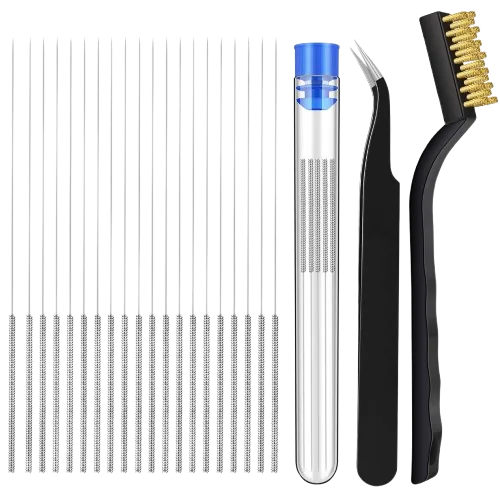
Clears the partial blockages that restrict flow and starve the extruder without fully clogging the nozzle.
Amazon →
Moisture-swollen filament extrudes inconsistently; drying it restores a steady, gap-free flow rate.
Amazon →
A worn or ovalized nozzle bore causes chronic under-extrusion that calibration cannot fix; this hardened 0.6mm high-flow nozzle for the P1P and P1S replaces it.
Amazon →The A1 alternative: hardened steel 0.4mm nozzles for the A1 and A1 Mini that restore a crisp bore when the stock nozzle wears out.
Amazon →Affiliate links. We may earn a small commission at no extra cost to you.
HMS codes that point here
If Bambu Handy or Bambu Studio shows one of these HMS codes, it maps to the problem on this page. Each code links to Bambu's official step-by-step fix; come back here if the official steps don't solve it.
HMS_0700-2000-0002-0009– Failed to extrude, extruder may be clogged · official fixHMS_1200-2000-0002-0006– AMS lite (A series): failed to extrude · official fix