Routine Maintenance Checklist
Weekly, monthly, and quarterly tasks to keep your printer running reliably.
How often should I maintain my Bambu printer?
Weekly: wash the plate with dish soap, inspect nozzle, empty waste bin. Monthly: check the X1/P1 carbon rods and belt tension. X1 Lidar: clean the lens when the printer reports a Lidar error, every 3–5 days if you print ABS regularly. Every 3 months: grease the Z lead screws. These few steps prevent most print failures.
What you need
- Nozzle Cleaning Kit 22pcs: Needles for the weekly nozzle inspection and for clearing clogs. View on Amazon
- ZDBB Silicone Grease: For the Z lead screws every three months; keep it off the X1/P1 carbon rods. View on Amazon
- Wera Hex-Plus L-Key Set: Ball-end hex keys from 1.5 to 10 mm for the quarterly screw check. View on Amazon
Affiliate links. We may earn a commission at no extra cost to you.
| Task | Frequency |
|---|---|
| Wash build plate (dish soap) | Weekly and when adhesion drops; IPA wipe between washes |
| Inspect nozzle exterior | Weekly |
| Empty waste bin | Weekly |
| Vacuum chamber | Weekly |
| Check PTFE tubes | Weekly |
| Check extruder gear | Weekly |
| Check carbon rods (X1/P1) | Monthly |
| Clean and oil rails (A1 / A1 mini) | Monthly |
| Clean Lidar lens (X1 series) | On a Lidar error; every 3–5 days with regular ABS |
| Check belt tension | Monthly |
| Grease Z lead screws | Every 3 months |
| Full mechanical check | Quarterly |
| Deep clean AMS | Quarterly |
| Hotend inspection | Quarterly |
Do these every week.
- Clean build plate: Wash with warm water and dish soap whenever adhesion drops and at least weekly; a 90%+ IPA wipe between washes is fine but does not replace the wash. Bambu recommends the wash because alcohol can spread finger oils on the textured plate (Bambu).
- Inspect nozzle: Look for filament buildup or wear on the tip. Clean exterior with a brass brush while at printing temperature. Never steel brushes.
- Empty waste bin: Clear purge material from the waste chute before it overflows into the print area.
- Vacuum chamber: Remove loose filament strands and dust from the chamber floor. Debris can get caught in the motion system.
- Check PTFE tubes (AMS): Inspect for kinks, cuts, or debris. A kinked tube causes feed errors that look like sensor problems.
- Check extruder gear: Look for filament dust on the extruder gear and blow or brush it clean when you see any; clogged teeth cause inconsistent extrusion. Bambu: check weekly on the X1, clean when dust shows on the yellow gear on the P1; on the A1 / A1 mini clean the extruder gear every 5 spools, every 2 spools with carbon fiber filaments.
- Check carbon rods (X1/P1 series): Look for dust and buildup on the X-axis rods. Clean them with IPA after every 5 kg of ABS/ASA or when ribbing appears, never with oil or grease.
- Clean and oil the rails (A1 / A1 mini): Clean the X linear rail and the Y guide rails (A1 mini also the Z rail) with tweezers and a lint-free cloth, then re-lubricate them with lubricant oil and slide the toolhead or bed back and forth to spread it. Never put grease on the X linear rail (Bambu: A1, A1 mini).
- Clean Lidar / camera lens (X1 series, as needed): Bambu sets no monthly interval: clean it when the printer reports a Lidar error or the laser looks abnormal, and every 3–5 days if you print ABS regularly, because ABS particles build up on the lens (Bambu). Gently wipe with a microfiber cloth and a little IPA (a cotton swab helps). Filament dust on the Lidar causes failed first-layer scans.
- Inspect belts: Look for fraying or debris in belt teeth. The printer flags a loose belt during calibration (HMS 0300-1000/1100-0002-0001); then retension as described in the belt tensioning guide.
- Check connectors: Reseat toolhead cable and any connectors that see movement. A loose thermistor connector causes thermal runaway errors.
- Z axis (every three months on X1/P1): Clean the three Z lead screws and apply a thin coat of grease; wipe the Y and Z linear rods with IPA and a little anti-rust oil. No oil or grease on the X1/P1 X-axis carbon rods. P2S, X2D and H2 series: Bambu oils the X and Y shafts or rails too.
- Lead screws (A1 / A1 mini, every three months): Apply lubricant grease to the working area of the Z lead screws (two on the A1, one on the A1 mini) and move the X-axis up and down so the whole working area is coated.
- Full mechanical inspection: Check all visible screws for tightness, bed mounting, gantry, and motion system bolts. Printers vibrate continuously and screws work loose.
- Deep clean AMS: Disassemble the AMS hub, clean feeder gears, inspect hall effect sensors. Blow out each slot with compressed air.
- Hotend inspection: Check nozzle for wear, especially if printing abrasive filaments. Replace the hotend when the tip is worn or damaged or extrusion stays inconsistent after cleaning; with CF/GF and particle-filled filaments check the nozzle and extruder gears more often (Bambu).
- Review firmware: Check for updates. Bambu releases updates that fix bugs and improve calibration. Update during a period without urgent prints, updates can change print behavior and may require recalibration.
- IPA spray bottle (90%+)
- Microfiber cloths
- Brass brush
- Tweezers
- Compressed air
- Lubricating grease (Z lead screws) and light lubricating oil (linear rods and A1 rails)
- H2.0 and H2.5 hex keys
Maintenance is much easier when you don't have to hunt for supplies each time.
| Between washes | IPA wipe plate |
| Weekly | Plate wash, nozzle, extruder gear, waste bin, chamber |
| Monthly | Belts, carbon rods or A1 rails |
| As needed | X1 Lidar lens (every 3–5 days with ABS) |
| Quarterly | Z lead screws, full inspection, AMS |
Need gear? Our tested picks · All accessories
Tools for this job
The consumables this maintenance schedule keeps calling for.
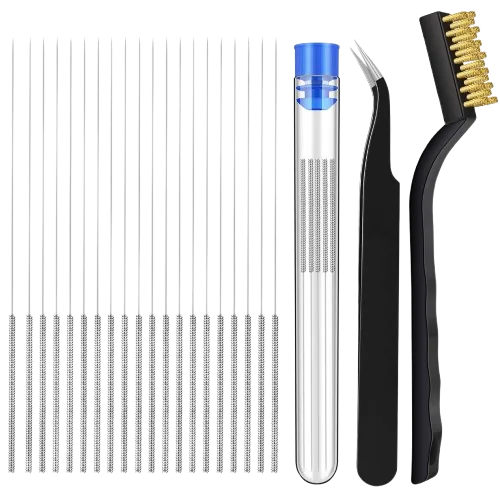

For the weekly nozzle wipe: brushes carbonized residue off the hot nozzle without scratching it.
Amazon →Silicone grease for the Z lead screws (every three months). Never use it on the carbon rods.
Amazon →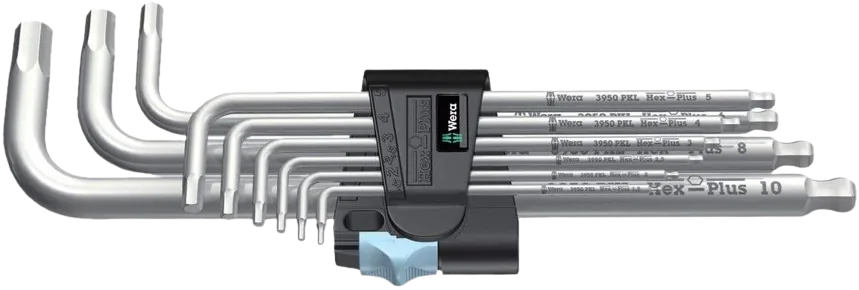
Covers every hex screw on the printer for the quarterly full inspection and re-tightening pass.
Amazon →Affiliate links. We may earn a small commission at no extra cost to you.