Bambu Lab S1: What the 3D Scanner Does, What It Costs and What Is Still Missing
Short version
Bambu Lab launched the S1, its first 3D scanner, on November 26, 2026 at $1,699 in the US store. It is a 710 g handheld with a blue laser in three line patterns and an infrared mode, rated by Bambu Lab at up to 0.02 mm accuracy with the laser. It is a pre-order: on launch day the store showed "ETD: Ship around December 04, 2026". The catch for many buyers is the computer. The scanning software, Bambu Scan, runs only on Windows PCs with an Nvidia graphics card for now; macOS support is "coming soon". We have not tested the S1. Every number here is Bambu Lab's own, checked on November 26, 2026.
- in the Bambu Lab US store, one version, no bundles
- $1,699
- best accuracy Bambu Lab states, blue laser modes, lab conditions
- 0.02 mm
- estimated ship date in the US store on launch day
- Dec 4
What the S1 is
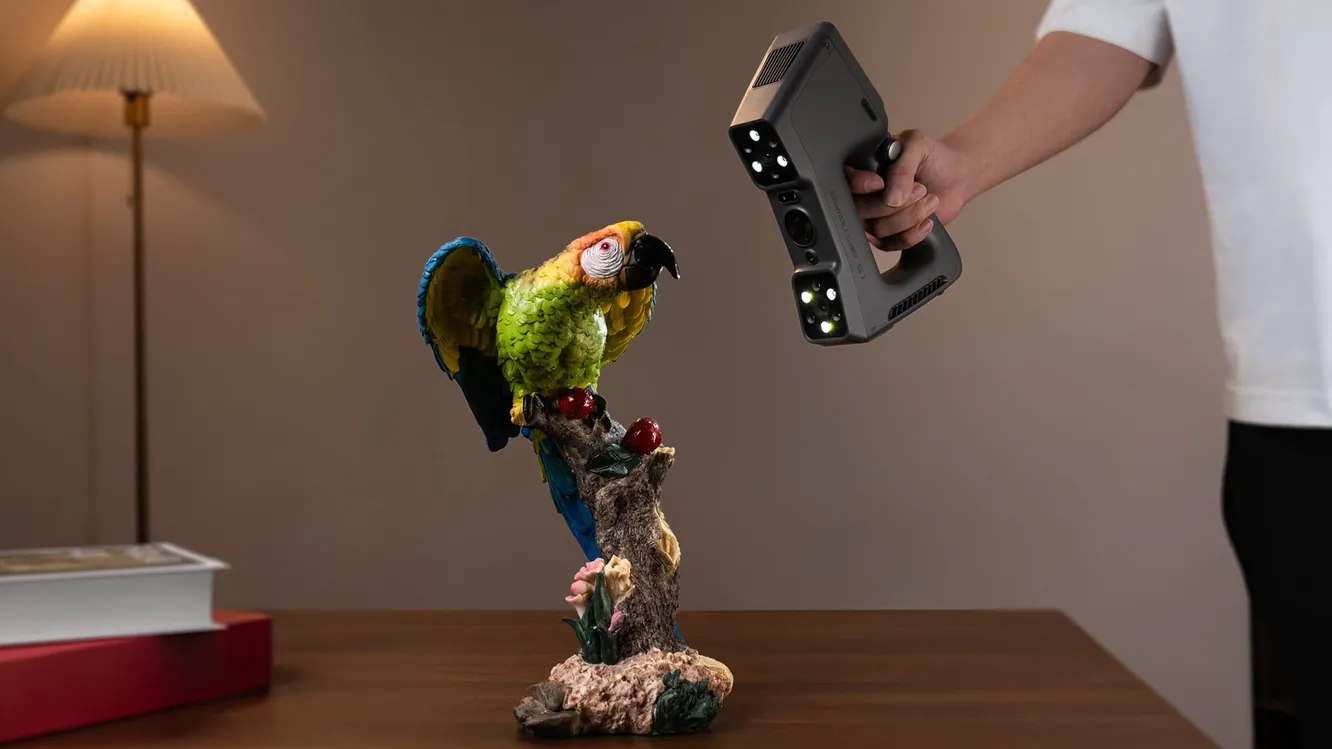
The S1 is a handheld 3D scanner: you walk around an object, the scanner measures its surface, and software on a PC turns the measurements into a 3D model. It is Bambu Lab's second machine that is not a 3D printer, after the R1 laser cutter in September, and the first one that feeds a printer instead of standing next to it.
Bambu Lab built everything needed for cable-free scanning into the body: two 4,800 mAh batteries, a 3.5-inch touchscreen and a Wi-Fi 6 module. The spec sheet lists 710 g and 233 × 160 × 77 mm. Bambu Lab states up to 3.5 hours of runtime, measured in its own lab at 25 °C, and 1.5 hours for a full charge with the included fast charger.
Inside are two light sources that give four scanning modes. Three use a blue laser with different line patterns, the fourth uses infrared structured light. Bambu Lab calls the infrared mode eye-safe and recommends it for scanning people; a color camera adds texture in every mode.
| Mode | What Bambu Lab suggests it for | Accuracy, up to | Points per second, up to | Working distance | Smallest point spacing | Laser class |
|---|---|---|---|---|---|---|
| 34 crossed blue laser lines | Large surfaces: cars, doors, furniture | 0.02 mm | 1,836,000 | 180 to 600 mm | 0.1 mm | Class 2 |
| 7 parallel blue laser lines | Detail-rich parts such as wheel hubs | 0.02 mm | 756,000 | 180 to 400 mm | 0.05 mm | Class 1 |
| Single blue laser line | Deep recesses and screw holes | 0.02 mm | 108,000 | 180 to 600 mm | 0.1 mm | Class 2 |
| Infrared structured light | Fast scans of larger objects, people | 0.06 mm | 2,880,000 | 180 to 1,000 mm | 0.2 mm | Class 1 |
Accuracy, working distance, point spacing and laser class are from Bambu Lab's spec page, the points per second and use cases from its launch post. Bambu Lab bases the laser classes on GB 7247.1-2012 and IEC 60825-1.
How to read the accuracy figures
Bambu Lab gives two numbers per light source. The first, up to 0.02 mm with the blue laser and up to 0.06 mm with infrared, is the accuracy of a single captured frame. The second is volumetric accuracy, the error that builds up as a scan grows: 0.02 mm + 0.06 mm/m with the laser, 0.06 mm + 0.1 mm/m with infrared. Bambu Lab's own example: on an object one meter long, the laser data stays within 80 microns, which is 0.08 mm.
All of these are lab values. Bambu Lab's footnote says they come from its own laboratory with specific samples and conditions and that results in use can differ. Two practical limits are also in Bambu Lab's material: transparent objects such as glass have to be coated with scanning spray, and for the best accuracy Bambu Lab's FAQ recommends the blue laser with marker-based alignment, which means working with the marker stickers from the box.
From scan to print
The S1 does not work on its own. It sends its data to Bambu Scan, a new Windows program that Bambu Lab wrote for it and offers as a free download. This is the route Bambu Lab describes from object to printed part:
- Tell the software what you are scanningBambu Scan has 14 scene presets, from "Face" and "Small Parts" to "Automotive Parts" and one for glossy black parts. Bambu Lab says a preset sets the scanning mode and parameters. Alternatively the software asks a few questions about the object and picks the settings.
- Scan, with or without a cableThe scanner connects to the PC by cable or over Wi-Fi 6. For wireless scanning the PC needs Wi-Fi 6 itself or a Wi-Fi 6 adapter. With a cable, Bambu Lab's FAQ recommends plugging the scanner straight into the PC with the official cable; it warns that a docking station may cause data loss.
- Clean up and measureBambu Scan includes 8 editing tools at no extra charge, among them Sculpt, Quick Measurement, a 3D deviation heatmap against a reference model and feature fitting for engineering work. One restriction from Bambu Lab's FAQ: some tools are limited when the S1 is not connected to the PC.
- Send it to the slicerA button in Bambu Scan hands the finished model to Bambu Studio. For other software, Bambu Lab's wiki lists STL, OBJ, PLY and ASC as export formats.
What Bambu Lab leaves out
Its launch material describes the hand-off to Bambu Studio only; uploading scans to MakerWorld is not mentioned. A scan is a mesh of triangles, not an editable CAD model: Bambu Lab lists STEP only as an import format for its measurement tools, not as an export.
Not tested by us. We do not have an S1. How well the presets work, how long a clean scan takes and how much rework a mesh needs before it prints are open until independent tests exist.
What it costs, and what you need besides
The S1 costs $1,699 in the Bambu Lab US store. There is one version and no bundle. In the box, according to the store page: the scanner, a calibration plate, 6 mm and 3 mm markers, a USB-C cable, a fast charger, a lanyard and a carry bag.
It is a pre-order. On launch day, November 26, 2026, the US store showed "ETD: Ship around December 04, 2026". Bambu Lab's R1 slipped from its first shipping estimate in the fall, so treat the date as an estimate, not a promise.
The larger cost can be the computer. Bambu Scan runs only on Windows for now, and only with an Nvidia graphics card:
| Bambu Scan on Windows | Minimum | Recommended |
|---|---|---|
| Processor | Intel i7 7th Gen or AMD Ryzen 7 series | Intel i7 13th Gen or AMD Ryzen 9 series |
| Memory | 16 GB or more | 32 GB or more |
| Graphics card | Nvidia 2060 or newer, at least 6 GB VRAM | Nvidia 3060 or newer, at least 8 GB VRAM |
| System | 64-bit Windows 10 or 11 | 64-bit Windows 10 or 11 |
Bambu Lab's FAQ is explicit about the rest: Windows PCs with ARM processors and Windows PCs without an Nvidia card are not supported, and macOS support is "coming soon" without a date. Bambu Lab's launch post already lists planned Mac requirements (M1 or newer, macOS 12, 16 GB), but until the Mac version ships, an S1 on a Mac-only desk does nothing.
Two accessories are announced and not yet priced: an electric turntable and a Wi-Fi adapter for PCs without Wi-Fi 6. The US store marks both "Coming soon".
S1 vs Elegoo M1 Ultra
The closest rival comes from another 3D printer maker. Elegoo has had its first scanner, the M1 Ultra, on pre-order since late October 2026, and the two are built on the same recipe: three blue laser patterns, an infrared mode, battery, touchscreen and Wi-Fi 6. On November 26, 2026 they also cost the same.
| Manufacturer data | Bambu Lab S1 | Elegoo M1 Ultra |
|---|---|---|
| Price, US store | $1,699 | $1,699 |
| Order status, November 26, 2026 | Pre-order, "Ship around December 04, 2026" | Pre-order, "Before December 15" |
| Scanning modes | 4: single line, 7 lines and 34 crossed lines (blue laser), infrared structured light | 5: the same three blue laser patterns, infrared structured light, plus a marker-free blue laser mode |
| Alignment | Blue laser: texture, geometry or markers, in any combination; infrared: texture or geometry | Markers, global markers or marker-free; geometry or texture |
| Accuracy, up to | 0.02 mm blue laser, 0.06 mm infrared | 0.02 mm blue laser, 0.05 mm infrared |
| Volumetric accuracy | 0.02 mm + 0.06 mm/m blue laser; 0.06 mm + 0.1 mm/m infrared | 0.02 mm + 0.06 mm/m blue laser; 0.05 mm + 0.1 mm/m infrared |
| Points per second, up to | 1,836,000 blue laser; 2,880,000 infrared | 2,040,000 blue laser; 6,451,200 infrared |
| Frame rate, up to | 90 fps blue laser; 80 fps over Wi-Fi | 100 fps by cable; 60 fps over Wi-Fi |
| Working distance | 180 to 1,000 mm | 160 to 1,200 mm |
| Object size | From 5 × 5 × 5 mm (blue laser); maximum not stated | 5 × 5 × 5 mm to 4,000 × 4,000 × 4,000 mm |
| Weight | 710 g | 511 g with battery (better) |
| Size | 233 × 160 × 77 mm | 191 × 50 × 76 mm |
| Battery | 2 × 4,800 mAh built in, up to 3.5 hours (better) | 4,800 mAh, swappable, up to 1.5 hours per charge; spare battery in the box |
| Screen | 3.5-inch touchscreen | 3-inch touchscreen |
| Wireless | Wi-Fi 6 | Wi-Fi 6 |
| Computer | Windows with Nvidia graphics; macOS "coming soon" | Windows and macOS (better) |
| Export formats | STL, OBJ, PLY, ASC | STL, OBJ, PLY, ASC |
| Also in the box | Calibration plate, markers, USB-C cable, fast charger, lanyard, carry bag | Glass calibration board, markers, USB cable, infrared filter, spare battery, tripod, lanyard, cleaning cloth |
Both columns are the makers' own figures from their product pages, read on November 26, 2026; neither scanner has been tested by us. The M1 Ultra price is the regular price: until November 12 Elegoo sold it for $1,599 as an early-bird offer, which we read on its product page at the time.
On paper the laser accuracy is identical and the differences are practical ones. The M1 Ultra is about 200 g lighter and works on a Mac today. The S1 runs more than twice as long on a charge without a battery swap, has the larger screen and, if you already slice in Bambu Studio, the shorter path to the printer. Which one produces the cleaner mesh is something a spec table cannot answer.
What speaks for the S1
- Up to 3.5 hours on the built-in batteries, by Bambu Lab's figure
- Editing and measuring tools included, no extra license
- One-click hand-off to Bambu Studio
- Ships from the US warehouse, with an earlier estimate than the M1 Ultra on launch day
What speaks against it today
- Windows with an Nvidia card only; no Mac version yet
- 710 g, about 200 g more than the M1 Ultra
- Turntable and Wi-Fi adapter announced without a price
- No independent test of the scanner or of Bambu Scan yet
What the FCC file had already told us
We first wrote about the S1 on October 7, 2026, from its FCC certification file, five days before Bambu Lab confirmed it. The launch settles how well that reading held up:
- Handheld and battery powered: confirmed. The file described a portable device tested for use at the hands. The S1 is exactly that.
- 5 GHz Wi-Fi only: consistent. The file showed only 5 GHz Wi-Fi switched on. Bambu Lab's spec page lists only 5 GHz frequency ranges, with Wi-Fi 6 as the standard.
- 60 W input: confirmed. The label in the file read 20 V, 3 A, 60 W. Bambu Lab now advertises fast charging at up to 60 W.
- Battery: half the story. The test report listed a 3.6 V, 4,800 mAh battery. The S1 has two of them, which the file did not show.
What no filing could tell us was the scanning method, the accuracy and the price. Those are the parts Bambu Lab filled in today.
Who it is for
- You repair, fit or copy physical parts. Brackets that have to sit on an existing housing, covers for a car interior, replacements for broken parts: this is what the laser modes and the measuring tools are aimed at. If you do this often and own a suitable Windows PC, the S1 is a serious tool at its price.
- You want to copy figurines and decor now and then. $1,699 is more than most Bambu Lab printers cost. For occasional scans that do not need hundredths of a millimeter, this is the wrong price class.
- You work on a Mac. Wait. Bambu Lab promises macOS support but gives no date, and the Elegoo M1 Ultra lists macOS today.
- You are deciding between the S1 and the M1 Ultra. Nothing forces a decision before the first independent tests: both are pre-orders, and Bambu Lab's US store shows 30-day returns and 30-day price protection.
Our take
The S1 is priced and specified like the Elegoo M1 Ultra, so the choice comes down to software and to the computer on your desk. If you live in Bambu Studio and have a Windows PC with an Nvidia card, the S1 is the natural pick once tests confirm Bambu Lab's numbers. If you use a Mac, it is not an option yet.
What is still missing
- A Mac version. Announced as "coming soon", no date.
- Accessory prices and dates. Turntable and Wi-Fi adapter are marked "Coming soon" in the US store.
- A maximum object size. Bambu Lab's launch post mentions cars and a preset for objects larger than 50 cm, but the spec page states only the minimum scan volume.
- Independent accuracy tests. Every accuracy figure so far is Bambu Lab's own lab value.
- Anything about MakerWorld. Bambu Lab describes export to Bambu Studio, nothing more.
- Proof of the ship date. December 4 is the store's estimate on launch day.
We will update this article when Bambu Lab ships the first units, prices the accessories or releases the Mac version.
Sources
9 sources, including Bambu Lab product pages, store, blog and wiki.
ShowHide
- Bambu Lab blog, launch post for the S1 with technical specification and US price (November 26, 2026)
- Bambu Lab, S1 product page with footnotes (accessed November 26, 2026)
- Bambu Lab, S1 technical specifications (accessed November 26, 2026)
- Bambu Lab, S1 FAQ: PC support, cables, restricted tools (accessed November 26, 2026)
- Bambu Lab US store, S1: price, ship estimate, box contents, accessories (accessed November 26, 2026, about 15:00 UTC)
- Bambu Lab wiki, Bambu Scan file formats (accessed November 26, 2026)
- Bambu Lab wiki, S1 overview (accessed November 26, 2026)
- Elegoo US store, M1 Ultra: price, shipping notice, specifications (accessed November 26, 2026; early-bird price read November 12, 2026)
- FCC record 2A6J8-DS001 via fccid.io, read for our FCC article in October 2026
- Title
- Bambu Lab S1 3D Scanner: Price, Specs and Rivals
- Section
- News
- Published
- Type
- Product news, not tested by us
- Facts checked
- Sources
- Listed under the article
- Page
- Status
- Not affiliated with Bambu Lab