Bambu PLA Palette CMYKW: Five Spools, Layered Color and What You Need
Short version
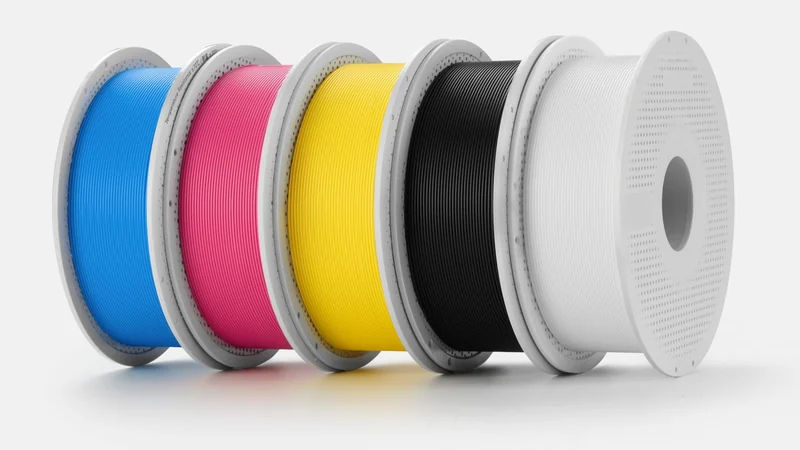
PLA Palette CMYKW is a set of five 1 kg PLA spools: cyan, magenta, yellow and white that block light, plus a translucent black. Bambu Studio's Color Mixing stacks very thin layers of two or three of them so a wall reads as a new color, and Bambu counts more than 180 combinations. The set costs $76.99 in Bambu's US store. Bambu calls it compatible with every Bambu printer, but its own wiki recommends a multi-nozzle printer: on a single nozzle the constant color changes cost far more filament and time.
What is in the box
Bambu announced PLA Palette CMYKW in its forum on November 5, 2026; the product data in its US store show the set on sale since November 3, the day the H3C launched. It is one box with five spools of 1.75 mm filament, 1 kg each, with the RFID tags the AMS reads to set the print parameters.
The set is built on Bambu's PLA Basic resin rather than a translucent formula. Bambu says that keeps stringing and oozing down when colors change often, which matters here, because a mixed print changes color far more often than a normal multicolor print.
| Color | Base | Hex code | Kind | Light through, per Bambu |
|---|---|---|---|---|
| Cyan | #0090DA | Opaque | Under 1% at a 2 mm wall | |
| Magenta | #E24585 | Opaque | Under 1% at a 2 mm wall | |
| Yellow | #FCE300 | Opaque | Under 1% at a 2 mm wall | |
| White | #FFFFFF | Opaque | Under 1% at a 2 mm wall | |
| Black (K) | #000000 | Translucent | Less as it gets thicker |
The split between opaque and translucent is the idea behind the set. Bambu's argument: most multicolor sets stack translucent filaments, and “everything turns hazy.” Opaque bases give full color and clean coverage, while the black “works like ink wash”: the thicker it gets, the less light passes, “so shadows deepen naturally as layers build.” Bambu publishes the under 1% figure for the opaque bases, but no numbers for the black.
How layered mixing works
Color Mixing is a Bambu Studio feature, not a printer feature. It arrived as an experimental option in Studio 2.5.3 on April 14, 2026. You add a mixed filament built from two or three filaments of the same type, and Studio splits each layer of the model into two or three thinner sublayers, each printed in a different filament. Seen from the side, the thin bands read as one new color: Bambu's wiki says PLA is slightly translucent, and at fine layer heights “the human eye naturally blends these micro-layers together.”
How the bands are built depends on one setting, Mixed color sublayer, under Process, Quality, Layer height:
- On. Studio splits each layer by the mix ratio. Bambu's example: at 1:9 and a 0.2 mm layer, 0.18 mm of one color and 0.02 mm of the other. For a 0.4 mm nozzle Bambu suggests the 0.20 or 0.24 mm presets and lets the sublayers do the mixing. Since Studio 2.9.1 the setting is on by default for the H3C's 0.4 mm presets at those two heights.
- Off. Every layer is one color, and the mix comes from how the layers alternate. Bambu suggests 0.08 to 0.12 mm layers and balanced ratios such as 1:1, 1:2 or 1:3; at 1:9 the blend gets noticeably worse.
Studio offers two ways in. For a 3MF model you add mixed filaments by hand or let Color Matching work out a ratio for a target color. For a textured model (OBJ, glTF, GLB or FBX with a texture map), Texture to Color Painting breaks the texture down into the bases. Studio 2.9.1 added a “Use Official Color Mixing Kit” button to both, which puts the five PLA Palette filaments into the project in one click; Bambu says Studio ships with a full blending database for the set. A Gradient mode blends two colors along the height of a part, with a curve to shape the transition since Studio 2.7.1.
What you need
- A Bambu printer. Bambu lists every Bambu printer as compatible, with nozzles of 0.2, 0.4, 0.6 or 0.8 mm. Which printer makes sense is a different question, see the next section.
- Enough AMS slots. The set works with the AMS, AMS 2 Pro, AMS HT and AMS lite. An AMS 2 Pro or AMS lite holds four spools, so one unit takes four of the five bases; Bambu's wiki shows a plate of Benchies mixed from cyan, magenta, yellow and white alone. All five at once need a fifth slot, for example an AMS HT, which holds one spool, on a printer that takes it (our ecosystem page lists which).
- Bambu Studio 2.5.3 or later for Color Mixing, 2.7.1 for the gradient curve and 2.9.1, the current stable release, for the kit button.
- Dry filament. Bambu says to dry the set before use: 50 °C for 8 hours in an oven, or in an AMS 2 Pro or AMS HT at 45 °C for 12 hours with the filament inserted (55 °C for 8 hours without), and to keep it below 20% relative humidity, sealed with desiccant. More in our drying guide.
- PLA only. Only filaments of one type mix, so PLA with PLA. For overhangs, Bambu suggests PETG as the support interface with a top Z distance of 0. Its data sheet lists 190 to 230 °C at the nozzle and 35 to 65 °C on the bed.
One nozzle or several
This is the real catch. Bambu's wiki recommends a multi-nozzle printer for color mixing: the layers are thin and the colors switch constantly, so a single nozzle produces “a large amount of waste” and takes much longer. Its example: four source filaments and about 170 filament changes cost 130 g of filament on a single-nozzle printer and 35 g in total on a multi-nozzle printer.
| Setup | Printers | Bambu's wiki says |
|---|---|---|
| One nozzle | A1 mini, A1, A2L, P1S, P2S, H2S | Possible, with much more waste and time |
| Two nozzles | X2D, H2D | Recommended |
| Hotend changer | H2C | Recommended |
| Tool changer | H3C | Recommended |
The H3C is the printer Bambu built this around. Its product page says that with “nine dedicated PrintTools and five-color CMYKW mixing” it prints a wide range of colors “without requiring a separate spool for every shade,” and quotes a purge of 38 mg, measured in internal testing under optimal conditions. The same page notes that its color mixing “requires CMYKW PLA Palette filament to achieve the intended result.” Bambu also sells an H3C Combo with a filament starter pack of TPU and CMYKW; more in our H3C article.
On a single-nozzle printer
With sublayers on, every mixed layer needs at least one filament change, and on one nozzle each change purges. Start with small parts, turn on “Flush into objects' infill” and “Flush into objects' support” as Bambu suggests, and see our multicolor guide for the other ways to cut waste.
Price and availability
Bambu's US store sells the set for $76.99 and lists a “Total Value” of $94.95 next to it, which it explains as the total price if purchased separately. It comes as one box of five spools; the store shows no refill version. On November 6 the store listed it as sold out, with an estimated date of November 9. The store page is a plain link, not an affiliate link.
If you already own Bambu PLA Basic in similar colors, Bambu's wiki says you can put together your own CMYKW set, but it does not promise the same result: PLA Palette is the set Bambu tested, so its mapped mixed colors are more accurate.
Limits and open questions
- Walls, not tops. Mixing works best on near-vertical walls. Bambu does not recommend it for slopes, overhangs or top and bottom surfaces.
- Thin sublayers have a cost. Sublayers can get as thin as 0.02 mm, which can cause melt fractureBambu's term for the surface defect that very thin layers can cause. It hurts surface quality but, per Bambu, usually does not make a print fail.. Bambu suggests avoiding extreme ratios and not combining sublayers with variable layer height.
- Dark colors dominate. Bambu's tips: use less of the dark filament in a mix, prefer two-color mixes, and print a small test swatch before the real part.
- Preview versus print. Bambu's launch text promises that “the color you see in the slicer preview is the color that comes off the plate.” Its own wiki still recommends a test swatch, and Studio 2.9.1 fixed a bug where the kit could miss the closest target color. We have not printed with the set, and we have seen no independent color measurements yet.
- 180+ is Bambu's number. Bambu does not say how it counts the combinations.
- One material. The set mixes only with PLA; for PETG or other materials it does nothing.
How it compares
Without mixing, every color in a print needs its own spool and slot. That is the limit Bambu's wiki names first: how many AMS units a printer takes and how many spools each one holds. Mixing trades slots for print time and purge.
Bambu did not invent layered mixing in slicers. Its wiki and the Studio 2.5.3 notes credit the color prediction to ratdoux's approach in OrcaSlicer-FullSpectrum. After community feedback, Bambu wrote in the Studio 2.6.0 notes that its code contained Full Spectrum's prediction code and that it would formally integrate it; according to the wiki, that happened in 2.6.1.
Other brands sell the same idea. Creality markets “CMYK full-color printing” for its SPARKX i8, which is also layered mixing of four base filaments, and claims “16 or even 32 color combinations” (see our A1 vs SPARKX i8 comparison). What PLA Palette adds is a filament made for the job, the split between opaque and translucent bases, and a color database in the slicer, if Bambu's claims hold up in print.
Who it is for
- H3C, H2C, H2D and X2D owners. This is the setup Bambu recommends, and on the H3C the five bases can stay loaded in their own PrintTools.
- A1, A2L, P1S, P2S and H2S owners. Worth a try on small parts with straight walls if you accept extra purge and print time; not the way to print large multicolor models.
- Anyone who wants many colors without buying many spools. That is Bambu's pitch. Check first whether your models are mostly vertical walls.
- Skip it if your models are mostly tops and slopes, or if you need an exact color for a product without testing it first.
Sources
12 sources, including Bambu's store, wiki, forum and release notes.
ShowHide
- Bambu Lab forum, “PLA Palette CMYKW: Five colors go in. Any color comes out” (posted by Bambu Lab on November 5, 2026, read November 6, 2026)
- Bambu Lab US store, PLA Palette CMYKW (price, Total Value, stock, estimated date, product features and product photo, checked November 6, 2026)
- Bambu Lab, technical data sheet PLA Palette CMYKW, V1.0 (PDF) (compatibility, nozzle sizes, temperatures, drying, read November 6, 2026)
- Bambu Lab, filament hex code table, Bambu PLA Palette (PDF) (read November 6, 2026)
- Bambu Lab wiki, Color Mixing (versions, layer heights, ratios, printer choice, the 130 g and 35 g example, tips, read November 6, 2026)
- Bambu Lab wiki, multi-model AMS compatibility guide (slots per AMS 2 Pro and AMS HT, read November 6, 2026)
- Bambu Studio on GitHub, release notes 2.5.3 (April 14, 2026: Color Mixing as an experimental feature)
- Bambu Studio on GitHub, release notes 2.6.0 (April 17, 2026: statement on the Full Spectrum code)
- Bambu Studio on GitHub, release notes 2.9.1 (November 3, 2026: PLA Palette support, kit button, H3C sublayer default, kit color fix)
- Bambu Lab, H3C product page (color mixing text and the 38 mg purge footnote, read November 6, 2026)
- Bambu Lab US store, H3C (the Combo with Filament Starter Pack, TPU and CMYKW, checked November 6, 2026)
- Our A1 vs SPARKX i8 comparison for Creality's claims about the SPARKX i8
- Title
- Bambu PLA Palette CMYKW: Five Spools, Layered Color and What You Need
- Section
- News
- Published
- Price checked
- November 6, 2026
- Type
- Filament
- Basis
- Bambu's store, wiki, forum and release notes; not tested by us
- Sources
- Listed under the article
- Page
- Status
- Not affiliated with Bambu Lab