Bambu A1 Combo vs Anycubic Kobra X: Where Do the Colors Live?
Short version
Both print four colors through one nozzle; they differ in where the colors live. The A1 Combo keeps its spools in the AMS lite beside the printer, and their tubes meet at a hub above the toolhead. The Kobra X carries its spools on top of the frame and, by Anycubic's account, switches them inside the printhead. It costs $279 in Anycubic's US store, the A1 Combo $359 in Bambu's, so the Kobra X is $80 cheaper. Anycubic lists PLA with PVA as a pair for the Kobra X, while Bambu advises against PVA in the AMS lite; the A1 Combo brings Bambu's automatic spool reading and purge control.
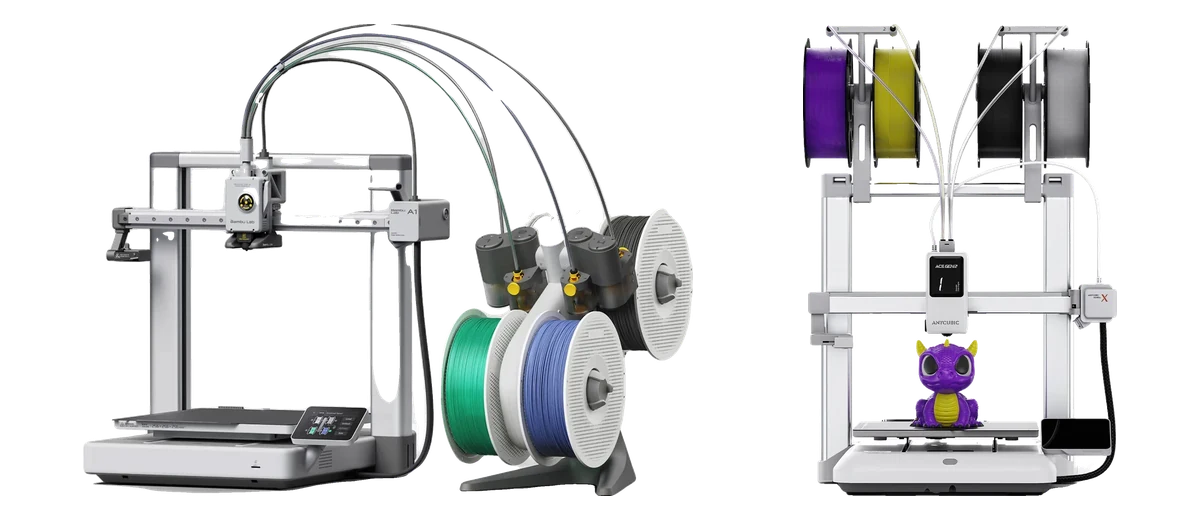
Two places for four colors
With one nozzle, every color change follows the same outline: cut the old filament, pull it back, feed the new one and purgePushing the old color out through the nozzle until only the new color comes out. The waste is dropped beside the plate, not on the print. what is left of the old color.
A1 Combo: beside the printer, joined above the toolhead
The AMS lite stands next to the A1, about 50 mm away as Bambu recommends. Each of its four slots has a feeder, and the four tubes meet at the filament hub above the toolhead. At a change the cutter cuts just above the hotend, and the feeder pulls the old filament back out of the hub before the next slot feeds in. What remains below the cut is pushed out next to the build plate.
Kobra X: on top of the frame, joined inside the printhead
The Kobra X carries its four spools on two holders on top of the frame. Four tubes run into the upper channel of the printhead. Anycubic calls what follows ACE GEN 2: its wiki says feeding, retraction and color switching are built into the printhead, and its component guide lists a four-inlet, one-outlet channel there, next to the extruder, hotend and cutter. The pages we read go no further into how the switch works, so neither do we.
What a color change costs
A shorter shared path is Anycubic's main argument. Its product page gives the retract distance at a color change as 30 mm on the Kobra X, against 160 mm on its own Kobra 3 V2, and 35 mm from cutter to nozzle. Less old filament below the cut should leave less to purge, as Anycubic claims, but the pages we read give no purge amount per change, and its comparison is with its older printer, not with Bambu.
We found no matching distance for the A1 from Bambu. What Bambu documents is the purge: Bambu Studio calculates a flushing volume for every color pair and lets you lower all of them with a multiplier, checked with test prints. Its four-color example cube needs 153 changes at 0.2 mm layers and 83 grams of waste. Without the same file printed on both machines, there is no fair number for which wastes less. Creality's SPARKX i8 also moves the switch toward the nozzle; see Bambu A1 Combo vs Creality SPARKX i8.
Loading the spools
On the A1 Combo you insert the filament into an AMS lite slot, which preloads it about 40 cm into the tube; an RFID coil reads a Bambu spool as you insert it, and third-party filament you edit by hand. On the Kobra X you push the filament into the inlet on the top holder and choose Load Filament. Anycubic's labeled spools are read when you hold them to the reader at the lower left of the printer and turn them slowly; other filament shows as gray until you set its color and type.
Space follows the spools: the AMS lite stands beside the A1, or on the top beam with a bracket Bambu points to on MakerWorld for a total height of about 80 cm, while the Kobra X always needs room above for its holders.
Past four colors
The AMS lite stops at four colors, and an A1 takes only one. For more, the A1 swaps it for up to four AMS, AMS 2 Pro or AMS HT units on the A Series AMS Hub, sold separately. Of those, the AMS 2 Pro and AMS HT dry filament, and an AMS 2 Pro on an A1 needs its own power adapter to do so.
The Kobra X grows through its printhead inlets. Add Anycubic's ACE 2 Pro, a four-spool box that dries filament while it prints, and one inlet goes to the box, leaving three for the spools on top. That is the Kobra X Combo: 7 colors, drying at up to 65°C, $449. With four ACE 2 Pro units and extra hubs, Anycubic lists 19 colors.
Right now the A1 Combo shows $359 against a typical price of $399 and the Kobra X $279 against a regular price of $399. At those regular prices the two cost the same, so the gap depends on the week you buy. Prices checked November 24, 2026 (Bambu) and November 29, 2026 (Anycubic).
Materials across the colors
In the AMS lite, Bambu advises against absorbent PVA, TPE, TPU of 95A and softer, and third-party fiber-filled filaments; it lists 55D and 77D TPU as usable. On the A1's stock stainless steel nozzle it also advises against carbon or glass fiber. Anycubic lists PLA with TPU 68D and PLA with PVA as pairs for the Kobra X, says the printhead adjusts its extrusion force to the filament's hardness, and fits a hardened steel nozzle as standard.
The rest of the machine
Both are open bed-slingersPrinters whose bed moves front to back under the print, while the toolhead moves left to right., as Anycubic's wiki confirms for the Kobra X with its front-to-back bed travel. The build volume is a 256 mm cube on the A1 and a 260 mm cube on the Kobra X; both beds reach 100°C and both hotends 300°C. Anycubic lists 600 mm/s and 20,000 mm/s², though its wiki says travel acceleration is limited to 10,000 mm/s² by default; Bambu lists 500 mm/s and 10,000 mm/s² for the A1. The A1 runs Bambu Studio, the Kobra X Anycubic Slicer Next, an Orca Slicer version.
| Feature | Bambu Lab A1 Combo | Anycubic Kobra X |
|---|---|---|
| Price (maker's US store) | $359 | $279 |
| Where the colors meet | Filament hub above the toolhead | Four-inlet, one-outlet channel in the printhead |
| Spools | AMS lite beside the printer or on the top beam | Two holders on top of the frame |
| Colors | AMS Lite (4 colors); AMS, AMS 2 Pro or AMS HT via A Series AMS Hub (up to 4 units) | 4 in the printhead; Combo 7; up to 19 with four ACE 2 Pro |
| Build volume (mm) | 256×256×256 | 260×260×260 |
| Motion system | Bed-slinger | Bed-slinger |
| Max nozzle temperature | 300°C, stainless steel nozzle | 300°C, hardened steel nozzle |
| Max bed temperature | 100°C | 100°C |
| Speed (maker's figures) | 500 mm/s, 10,000 mm/s² | 600 mm/s max, 300 mm/s recommended; 20,000 mm/s² max |
| Drying while printing | With AMS 2 Pro or AMS HT via the hub | With ACE 2 Pro, up to 65°C (in the Combo) |
| Camera | Basic camera | Built in, 720p |
| Printer weight | 8.3 kg | 9.5 kg |
| Slicer | Bambu Studio | Anycubic Slicer Next (Orca Slicer version) |
Five questions before you buy
- How many colors, now and later? The A1 Combo tops out at four until you move to full AMS units on the hub, while the Kobra X adds ACE 2 Pro boxes up to 19.
- Soluble supports in a multicolor print? PLA with PVA points to the Kobra X, which Anycubic lists as a pair, because Bambu advises against absorbent PVA in the AMS lite.
- Drying while printing? The Kobra X Combo has it in the box with the ACE 2 Pro; for the A1, Bambu's drying units, the AMS 2 Pro and AMS HT, connect through the hub.
- Where will the spools go? Desk space beside the printer suits the A1 Combo, and headroom above suits the Kobra X.
- Whose filament and software? Bambu spools read themselves in the AMS lite and Bambu Studio tunes the purge per color pair; the Kobra X reads Anycubic's labeled spools and uses Anycubic's Orca-based slicer.
Where to buy
- Day-one accessories
- Build platesFilament dryers
Sources
17 pages from Anycubic and Bambu Lab, including both wikis and Anycubic's US store.
ShowHide
- Anycubic US store: Kobra X (price, specifications, FAQ, packing list, the ACE GEN 2 feature images with the retract and cutter distances) and Kobra X Combo (price, ACE 2 Pro, drying), with the Black Friday page
- Anycubic Wiki, Kobra X: FAQ (ACE GEN 2, 3 + 4 × 4 colors, spool reading, materials, acceleration limit, holder), key components, quick start guide, upper channel, 5 to 19 color installation
- Bambu Lab Wiki: AMS lite modules and functions, AMS lite FAQ, A1 FAQ, AMS lite top mount, A1 filament cutter lever, Reduce waste during filament change, AMS compatibility guide
- Bambu Lab, A1 tech specs and US store page for the A1 and A1 Combo
- Anycubic pages and Bambu Lab Wiki pages accessed November 24, 2026; Bambu Lab prices and specs from our printer data, taken from the two bambulab.com pages above. Figures and descriptions are the makers' own.
- Title
- Bambu A1 Combo vs Anycubic Kobra X: Where Do the Colors Live?
- Section
- Compare
- Published
- Prices checked
- November 24, 2026
- Sources
- Listed under the article
- Page
- Status
- Not affiliated with Bambu Lab