Bambu A1 Combo vs Flashforge AD5X: Your First Four-Color Print
Short version
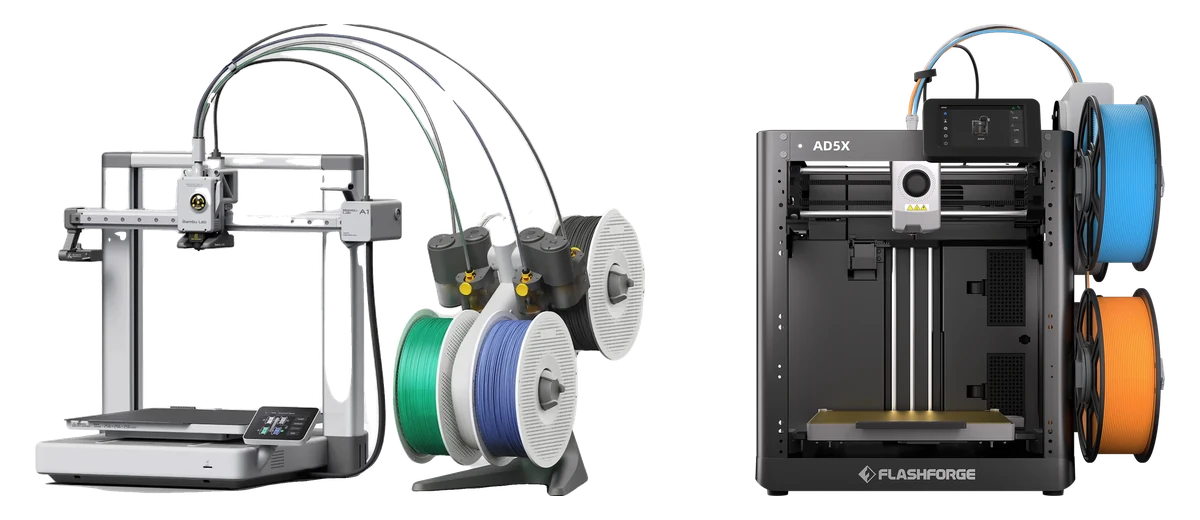
The A1 Combo costs $359 in Bambu's US store, the AD5X $349 in Flashforge's. Both run four spools into one nozzle and purge at every color change; Bambu lets you tune that purge per color pair, while the AD5X drops its waste out the back into a container you supply. The A1 Combo adds the larger build volume (256 mm cube against a 220 mm cube), a built-in camera and MakerWorld; the AD5X adds CoreXY, a hotter bed, Ethernet and spools that hang on the printer. For a first multicolor printer, the A1 Combo is the safer pick.
What happens at a color change
At every color change, the old color has to leave the single nozzle before the new one prints; Bambu's four-color example cube needs 153 of them at 0.2 mm layers. Here is each loop as its maker describes it, without filling gaps from the other.
Bambu A1 Combo with the AMS lite
- CutA blade on the toolhead's cutter lever cuts the filament just above the hotend.
- Pull backThe extruder pushes the old filament back and the AMS lite feeder pulls it out of the hub above the toolhead; the spool holder turns back by up to 150° to keep it tight.
- FeedThe next slot's feeder pushes the new filament to the toolhead and stops once the extruder gear has gripped 3 mm of it.
- PurgeNext to the build plate, the extruder pushes the old filament left below the cut through the nozzle until only the new color comes out. Bambu Studio sets the amount per color pair.
- WipeThe nozzle wipes over the purge wiper. The waste lands on the wiper's plate, which knocks it away from the print area as the toolhead leaves.
- PrimeBy default the nozzle then prints into a prime tower on the plate; Bambu's A1 FAQ suggests placing it near the purge wiper on the left.
Flashforge AD5X with the IFS
- CutA cutter at the extruder cuts the filament. If it fails, Flashforge's error list says, the filament cannot be pulled out of the extruder.
- Pull backThe IFS pulls the old filament back; on an unload from the screen, the manual says, it retracts to the top of the guide tube. The spool holders rewind in reverse against tangles.
- FeedThe IFS, two stepper motors with a clutch shaft and four channels, switches channel and feeds the next filament through the 4-in-1 guide tube into the extruder.
- Clean the nozzleFlashforge says the nozzle is cleaned each time the material is switched; the pages we read give no amount.
- Waste out the backWaste filament leaves through an outlet on the back. Empty the bin before it overflows, Flashforge says, or the printer cannot discharge the filament. No bin is in the box; the wiki offers a printable chute and basket.
What differs for a first print
Either way, every change costs filament and time. The difference is control: Bambu Studio shows the flushing volumes and lets you lower them with a multiplier, checked with test prints as Bambu advises, while Flashforge says little about the purge. Creality's SPARKX i8 tackles the waste differently; see Bambu A1 Combo vs Creality SPARKX i8.
Loading the four spools
The AMS lite stands about 50 mm beside the A1, as Bambu recommends, or on top with a printable bracket from Bambu. Its RFID coils read each spool's information as you insert the filament, and the slicer maps the model's colors to the closest loaded filament; third-party filament you set by hand. With the separately sold A Series AMS Hub, the A1 can run up to four AMS units, including the AMS 2 Pro, though not together with the AMS lite.
On the AD5X the IFS is standard, and Flashforge's store sells only that version. You mount the module on the printer's side, clip the spool holders to the frame with matching numbers and channels, and set each channel's type and color by hand; the printer only prints when the filament type in the sliced file matches the one set for the channel. Flashforge's product page does not mention adding more than four colors.
Build volume and motion
The A1 has the larger plate: 256 × 256 × 256 mm against 220 × 220 × 220 mm, or 1.6x the space. That matters for helmets, cosplay parts and anything you would otherwise have to split.
On the A1, a bed-slinger, the bed moves front to back under the print. On the AD5X's CoreXY frame, two motors move the toolhead in X and Y and the bed only moves down as the print grows; Flashforge says this keeps tall prints steady and lists 2x the A1's acceleration (20,000 mm/s² against 10,000 mm/s²). Its 600 mm/s headline is travel speed; its maximum print speed is 300 mm/s. Bambu gives the A1 a maximum toolhead speed of 500 mm/s without that split, so the numbers do not compare directly.
Materials, camera and software
Both hotends reach 300°C; the AD5X bed goes to 110°C, 10°C more than the A1's 100°C. Bambu rates PLA, PETG, TPU and PVA as ideal on the A1 and ABS, ASA, PC, nylon and fiber-filled filaments as not recommended. Flashforge lists PLA, PETG, TPU, PLA-CF and PETG-CF and markets its $49 enclosure kit for ABS and ASA, which that list leaves out.
The A1 has a camera built in, with timelapse; Flashforge's $39.99 camera kit for the AD5X is sold separately (in stock in its US store on November 25, 2026). The A1 runs Bambu Studio and the Bambu Handy app with one-click MakerWorld printing; the AD5X runs Orca-Flashforge or Orca Slicer and the Flash Maker app, and adds an Ethernet port, which the A1's spec sheet does not list.
Price and verdict
Right now the AD5X is the cheaper of the two by $10: $359 for the A1 Combo, $349 for the AD5X. Bambu shows its price as a sale price against a typical price of $399; Flashforge shows a struck-through regular price of $499. At those regular prices the AD5X costs $100 more, so which one is cheaper depends on the week you buy. Prices checked November 24, 2026 (Bambu) and November 25, 2026 (Flashforge).
Our take
For a first four-color printer, get the A1 Combo: a documented purge you can tune, the larger plate, a camera in the box and room to grow past four colors. Pick the AD5X if you want CoreXY at this price for tall, narrow parts, your prints fit a 220 mm cube, the spools should sit on the printer, or you need Orca Slicer or Ethernet. Plan for a bin behind it.
Where to buy
- Day-one accessories
- Build platesFilament dryers
Specs at a glance
The makers' own figures.
| Feature | Bambu Lab A1 Combo | Flashforge AD5X |
|---|---|---|
| Price (maker's US store) | $359 | $349 |
| Build volume (mm) | 256×256×256 | 220×220×220 |
| Motion system | Bed-slinger | CoreXY |
| Speed (maker's figures) | 500 mm/s max toolhead speed, 10,000 mm/s² | 300 mm/s max print speed, 600 mm/s travel, 20,000 mm/s² |
| Max nozzle temperature | 300°C | 300°C |
| Max bed temperature | 100°C | 110°C |
| Frame | Open | Open; enclosure kit $49 extra |
| Multicolor | AMS Lite (4 colors); AMS, AMS 2 Pro or AMS HT via A Series AMS Hub (up to 4 units) | IFS for four spools, standard, mounted on the printer |
| Camera | Built in, low frame rate, up to 1080p, timelapse | Not included; camera kit $39.99 |
| Connectivity | Wi-Fi | Wi-Fi, Ethernet, USB |
| Slicer | Bambu Studio | Orca-Flashforge, Orca Slicer |
Sources
18 pages from Bambu Lab and Flashforge, including both wikis and the AD5X manual.
ShowHide
- Flashforge, AD5X product page (specifications, FAQ on the extruder cutter, nozzle cleaning, US price), with the Enclosure Kit and Camera Kit pages
- Flashforge, AD5X user manual (PDF on the Flashforge Wiki: printer components with the waste outlet, loading the IFS, unloading)
- Flashforge Wiki, AD5X: introduction, error code list, multi-color printing, unboxing and packing list, accessories in the box, poop chute
- Bambu Lab, A1 tech specs and US store page for the A1 and A1 Combo (AMS lite top mount, MakerWorld)
- Bambu Lab Wiki: multi-model AMS compatibility guide (A1 Series: up to four AMS, AMS 2 Pro or AMS HT through the A Series AMS Hub, not together with the AMS lite; firmware 01.07.00.00 or later)
- Bambu Lab Wiki: Reduce waste during filament change, A1 filament cutter lever, AMS lite modules and functions, A1 series excess purge, A1 FAQ, AMS compatibility guide
- All pages accessed November 23, 2026; figures and descriptions are the makers' own.
- Title
- Bambu A1 Combo vs Flashforge AD5X: Your First Four-Color Print
- Section
- Compare
- Published
- Prices checked
- November 24, 2026
- Sources
- Listed under the article
- Page
- Status
- Not affiliated with Bambu Lab