BIQU Infinity Bed for the P1S and P2S: The Conveyor Bed, Explained
Short version
BIQU's Infinity Bed ($259) is a heated bed for the P1P, P1S and P2S whose print surface is a belt: when a print is done, the belt advances, releases the part and clears the way for the next job in the queue. It brings its own mains input and its own LAN and Wi-Fi hub, and it costs build height: 235 mm on the P1 version and 250 mm on the P2 version, against 256 mm stock. BIQU leaves open whether its hub needs Bambu's Developer Mode, which runs the printer without Bambu Cloud. Not tested by us.
- Price at BIQU, P1 or P2 version
- $259
- Build height left with the P1 version
- 235 mm
- Highest bed temperature, per BIQU's manual
- 110°C
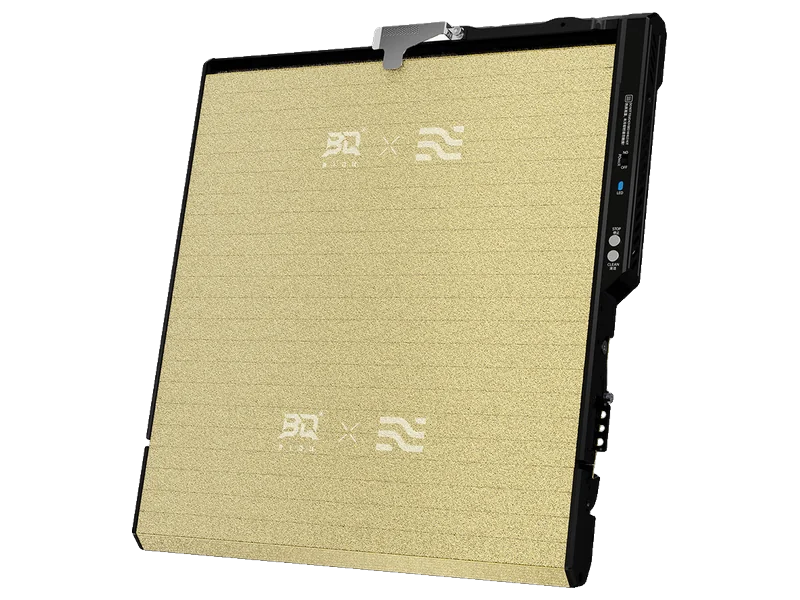
What the Infinity Bed does
BIQU sells the bed together with FOXLT as a "conveyor-style build plate" with "automatic model release". Once a print is completed, the platform advances to make room for the next model, BIQU writes, and its user manual calls the unit an "auto-unloading heated bed". In BIQU's product images the finished parts leave over the front edge of the bed and drop into a bin in front of the printer.
The jobs come from BIQU's own software, Infinity Bed Hub. Per the manual you scan the network for printers, bind one with its pairing code, pick a file that already sits on the printer's external storage, set the print options and add the job to a task list. On the bed itself, a short press on Clean starts the platform cleaning, and Stop is the emergency stop for it, whether you started the cleaning by hand or the hub did.
Specs, and what changes on your printer
BIQU lists two versions at the same price. The Infinity Bed P1 is for the P1 series, the P2 for the P2S, as 3Druck reads BIQU's naming. The manual covers the P1 and names the P2 as the other model of the series; the figures below that only the manual gives apply to the P2 as well.
| Item | Infinity Bed P1 | Infinity Bed P2 |
|---|---|---|
| For | P1P, P1S | P2S |
| Price at BIQU | $259 | $259 |
| Size in BIQU's listing | 254 × 235 × 235 mm | 254 × 235 × 250 mm |
| Print volume in the manual | 256 × 256 × 235 mm | Not stated (manual written for the P1) |
| Stock build volume | 256 × 256 × 256 mm | 256 × 256 × 256 mm |
| Highest bed temperature | 110°C | 110°C |
| Stock bed, highest temperature | 100°C | 110°C |
| Power | Own mains input, 110 to 240 V, 200 to 1,000 W | Own mains input, 110 to 240 V, 200 to 1,000 W |
| Connection | LAN and Wi-Fi | LAN and Wi-Fi |
| Chamber sensor | NTC temperature sensor | NTC temperature sensor |
| Outer size of the unit | 276 × 304 × 33 mm | Not given |
| In the box | Bed, three hex keys, P1 filament wiper, one M3 × 5 screw | Not shown |
Two things stand out. The height is clear: 235 mm on the P1 version is in both the listing and the manual. Width and depth are not: the listing gives 254 × 235 mm without saying what it measures, the manual 256 × 256 mm as the print volume. Plan with the smaller figure until BIQU clears it up. And the bed is rated for its own mains power, 110 to 240 V and up to 1,000 W per the manual. It also runs 110°C, 10°C more than the stock P1S bed and as much as the P2S bed.
The open question: Developer Mode
BIQU says the Infinity Bed needs no firmware modification. It does not say how Infinity Bed Hub talks to the printer, and on current Bambu firmware that decides what you give up. Bambu's wiki lists "starting a print job (via LAN or cloud mode) from other software besides Bambu Studio" among the commands that require Bambu Connect, while "starting prints from an SD card" is not affected. Developer Mode runs without that authorization check, but Bambu says it "will not allow the printer to be connected to Bambu Cloud", so the printer works in LAN mode only.
Infinity Bed Hub starts files that already sit on the printer's storage, but it sends the command over the network, so it could fall on either side of that line. If you print through Bambu Cloud or the Handy app, ask BIQU before you order. Our Bambu Connect explainer covers what Developer Mode costs.
What Bambu's warranty says
Bambu's warranty policy does not name the Infinity Bed, but two rules touch it. If the printer is damaged by a third-party accessory, or the accessory by the printer, the damaged parts of both are not covered. And among the cases in which Bambu says it is unable to provide repair, it lists a product or part "modified to significantly alter functionality or capability without the written permission of Bambu Lab". Whether a swapped bed counts as such a modification, the policy does not say. If your printer is still under warranty and that matters to you, ask Bambu support before you install it.
Who it is for
- Small sellers and print farms with a P1S or P2S. The same part many times over: the belt clears the bed, the hub queues the next file.
- Batch printing overnight. One job after another without anyone at the printer to swap plates.
- Not for tall parts. Above 235 mm on the P1 version, or 250 mm on the P2, a part no longer fits.
- Not yet for cloud and Handy users, until BIQU says whether the hub needs Developer Mode.
Pros
- Clears finished parts and starts the next job without you, per BIQU
- No firmware change and no extra build plates, per BIQU
- Heats to 110°C, more than the stock P1S bed
- One price for the P1 and the P2 version
Cons
- Less build height: 235 mm or 250 mm instead of 256 mm
- Unclear whether the hub needs Developer Mode
- Its own mains input, rated up to 1,000 W
- No reviews or owner reports yet
Running several printers already? Our guide to production printing on Bambu printers covers the rest of the workflow.
What BIQU has not said yet
- Filaments. Neither the listing nor the manual names the materials the belt releases reliably, or the bed temperatures to use for them.
- Part size. No limits for how tall, heavy or small a part may be to leave the bed cleanly.
- Belt life. No figure for how long the belt lasts.
- The front door. BIQU's images show parts leaving over the front edge; whether the door of a P1S or P2S has to stay open, BIQU does not say.
- The hub. The manual does not say where Infinity Bed Hub runs, on the bed itself, on a phone or on a computer.
Our take
Worth watching if your P1S or P2S prints the same part all day
For $259 the Infinity Bed automates the one step a P1S or P2S still needs a person for between prints, and BIQU's promise of no firmware change and no extra plates is the right one. Two things keep us from recommending it yet: there are no owner reports so far, and BIQU has not said whether the hub needs Developer Mode, which would take Bambu Cloud away. We have not tested it.
Common questions
Does the Infinity Bed need a firmware change?
BIQU says no, and no extra build plates either. It does not say whether its software, Infinity Bed Hub, needs Bambu's Developer Mode, which runs the printer in LAN mode without Bambu Cloud.
Which printers does it fit?
BIQU lists the P1P, P1S and P2S, in two versions: the P1 for the P1 series and the P2 for the P2S. No other Bambu printer is on the list.
How much build height do I lose?
With the P1 version the height drops to 235 mm, with the P2 version to 250 mm, from 256 mm stock. BIQU's listing and manual disagree on width and depth: 254 × 235 mm against 256 × 256 mm.
Sources
8 sources, including BIQU's product page and manual and Bambu Lab's wiki and warranty policy.
ShowHide
- BIQU, BIQU × FOXLT Infinity Bed P1/P2 for Bambu Lab P1P/P1S/P2S, product page and product images (accessed November 21, 2026)
- BIQU × FOXLT Infinity Bed P1 User Manual V1.0, FCC ID 2BAS6-INFINITYBED, document 9669791, filed September 21, 2026, copy on fccid.io (accessed November 21, 2026)
- FCC ID 2BAS6-INFINITYBED, filing by Shenzhen BIQU Innovation Technology, 2402 to 2480 MHz (accessed November 21, 2026)
- Bambu Lab wiki, Third-party Integration with Bambu Lab Products (accessed November 21, 2026)
- Bambu Lab, Warranty Policy (accessed November 21, 2026)
- 3Druck.com, BIQU Infinity Bed: Conveyor belt pushes finished prints out of the Bambu Lab P1S and P2S (accessed November 21, 2026)
- Bambu Lab, P1S tech specs
- Bambu Lab, P2S specs
- Title
- BIQU Infinity Bed for the P1S and P2S: The Conveyor Bed, Explained
- Section
- News
- Published
- Last updated
- BIQU price checked
- November 21, 2026
- Sources
- Listed under the article
- Page
- Status
- Not affiliated with Bambu Lab